
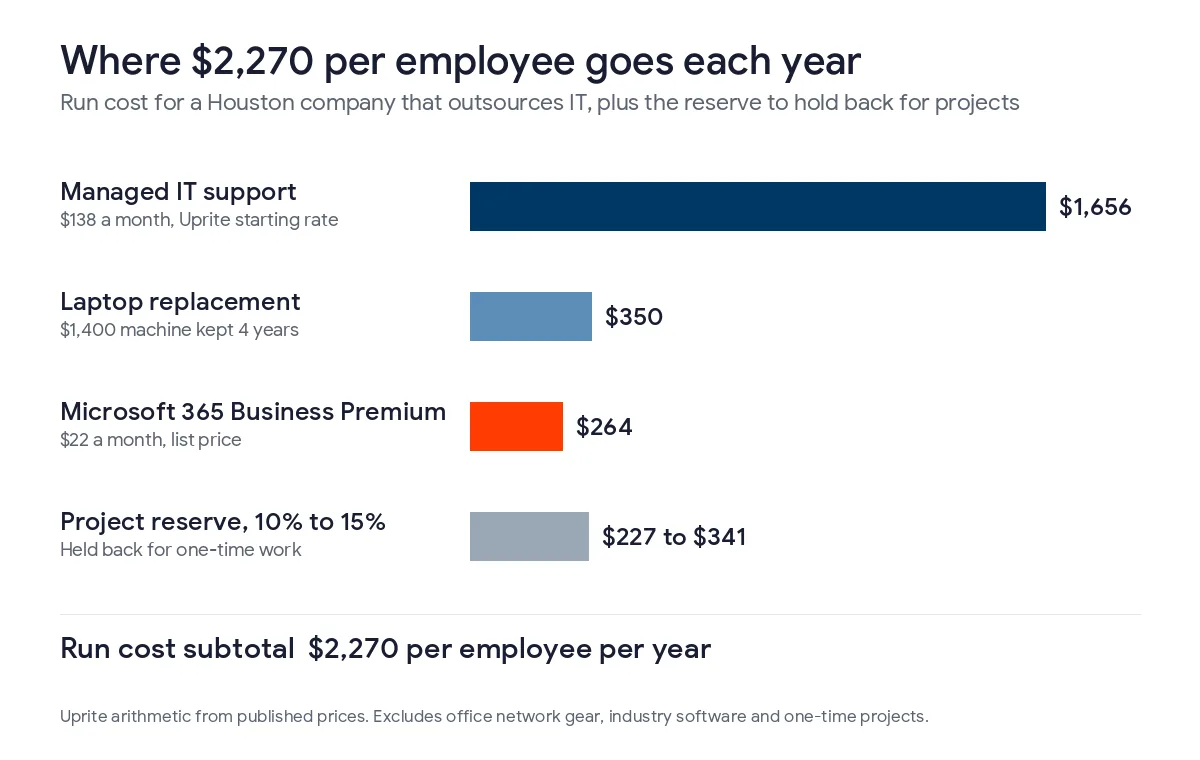
Budget about $2,270 per employee per year for outsourced IT in Houston, covering support, Microsoft 365 and laptops, and hold another 10% to 15% for projects.
That’s the figure I’d use for a company with no IT staff of its own. It comes from 3 prices you can check, which are our $138 Fully Managed rate, Microsoft’s $22 list price for Business Premium, and a $1,400 laptop spread over 4 years. Swap in your own contract numbers wherever they differ. The wider planning work, roadmaps and a vCIO, is covered on our page about IT strategy consulting in Houston.
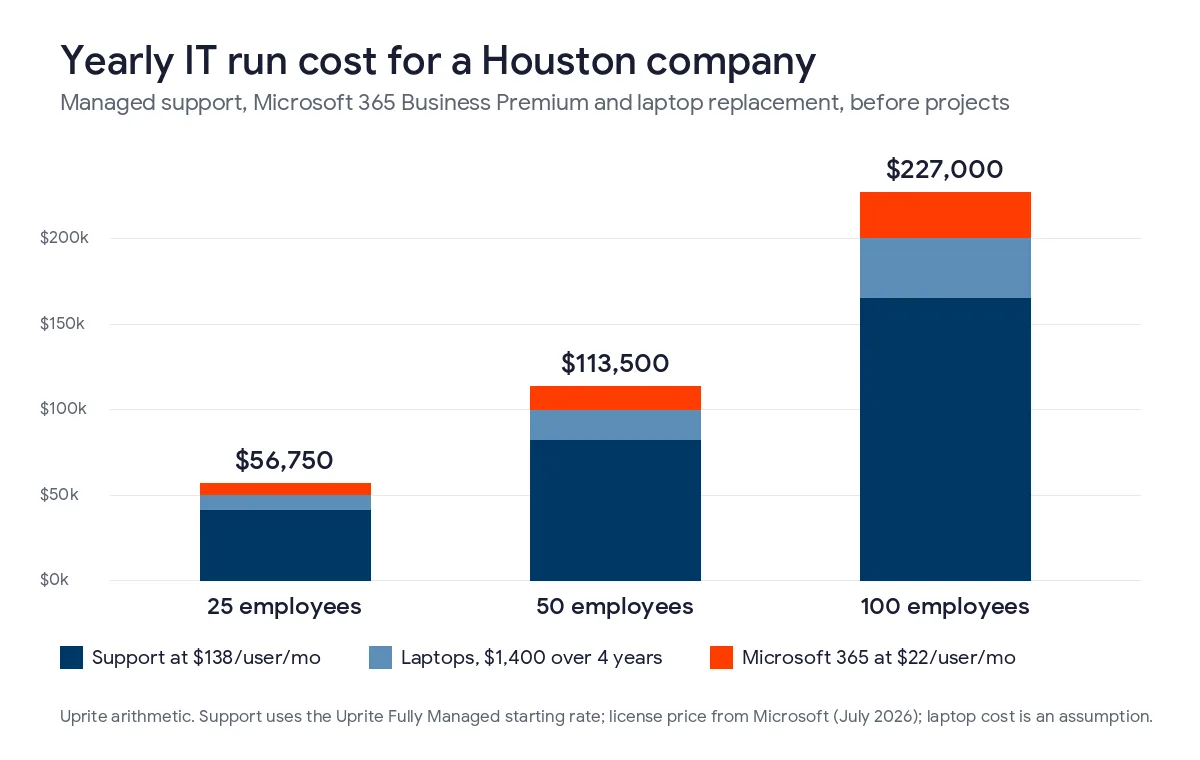
At 25 employees the run cost is about $56,750 a year, at 50 it’s $113,500, and at 100 it’s $227,000. None of that includes office network gear or one-off projects. Houston budgets also need money for storm backup, and any Windows 10 PCs still in use now cost $183 each to keep patched. Percent-of-revenue rules make a decent check afterward but a poor starting point.
What goes into an IT budget for a Houston company?
An IT budget is a company’s planned spending on technology for the year. That includes support, software licenses, computers, network equipment, security, backups and projects. For a business that doesn’t employ IT staff, the support contract tends to be the biggest share, with Microsoft licenses and hardware behind it.
Two kinds of cost go into it. Monthly costs rise with each hire. One-time costs, such as an office move or replacing a server that’s been in the closet since 2017, arrive at odd intervals, and they’re the usual reason a budget runs over.
- Support contract or IT salaries
- Microsoft 365 and any industry software
- Laptop and desktop replacements
- Firewall, switches, Wi-Fi and internet service for each office
- Security tools, training and written policies
- Backup, plus storm continuity
- A project reserve
How much should you budget per employee?
Start with the 3 lines that scale with every hire. The table uses our own starting rate for support because it’s the one we can vouch for, and Microsoft’s list price for licenses. The laptop figure is a planning assumption, so change it if your team runs heavier or lighter machines.
| Line item | How it’s priced | Per employee per year |
|---|---|---|
| Fully Managed IT support | $138 per user per month, Uprite starting rate | $1,656 |
| Microsoft 365 Business Premium | $22 per user per month, Microsoft list price | $264 |
| Laptop replacement | About $1,400 a machine kept for 4 years (assumption) | $350 |
| Run cost subtotal | Before projects and office gear | $2,270 |
| Project reserve | 10% to 15% of the subtotal | $227 to $341 |
The support rate on our pricing page includes 24/7 support, the security stack, monitoring, backup with quarterly restore testing, and planning sessions with a vCIO. Licensing is billed on top, which is why Microsoft 365 gets its own row. Microsoft kept Business Premium at $22.00 when it raised other plans on July 1, 2026, according to its 2026 packaging and pricing update, so the license line is steady for now.
You’ll see percent-of-revenue rules quoted everywhere, and our own post on budgeting for IT in a growth year mentions a 3% to 7% range. That range works as a sanity check after the budget is built. I wouldn’t build the budget from it, because a 40-person engineering firm and a 40-person distributor can have very different revenue and still need the same 40 seats, the same licenses and the same number of laptops.
What does that look like for 25, 50 or 100 employees?
Here are the same lines multiplied out for 3 company sizes. They’re run costs only. Office network gear isn’t in them, and neither are projects or anything specific to your trade, like dental imaging software or an engineering firm’s CAD licenses.
| Employees | Support | Microsoft 365 | Laptops | Run cost per year | With a 10% reserve |
|---|---|---|---|---|---|
| 25 | $41,400 | $6,600 | $8,750 | $56,750 | $62,425 |
| 50 | $82,800 | $13,200 | $17,500 | $113,500 | $124,850 |
| 100 | $165,600 | $26,400 | $35,000 | $227,000 | $249,700 |
In the laptop column, roughly a quarter of the machines get replaced each year. Plenty of companies buy a whole fleet at once instead, and then the replacement year costs 4 times the figure above while the next 3 years look cheap. I’d rather see it spread out, mostly because it makes this year’s budget comparable with last year’s.
What’s different about budgeting for IT in Houston?
Storms, local IT wages and one Texas law change the numbers here compared with a budget written for anywhere else.
Storm outages belong in the budget
When Hurricane Beryl came ashore on July 8, 2024, 2.7 million customers lost power, 2.2 million of them on CenterPoint’s system. That count comes from the Public Utility Commission of Texas investigation report on the derecho and Beryl, which also found phone and internet service across the Greater Houston Area was disrupted from July 8 to July 16 for most providers. Two months earlier the May derecho had knocked out more than 1 million customers.
So the Houston version of the budget has a few extra items in it. There’s a second internet connection from a different carrier, or a cellular one, plus battery backup for the firewall and switches, and files and phones hosted in the cloud so staff can work from any house that still has power. Our guide to hurricane disaster recovery in Houston covers the plan itself. I’d keep it as a separate line in the budget, since a line with a name on it is harder to cut without anyone noticing.
An in-house hire costs more than the salary
Computer user support specialists in the Houston metro earned a mean of $62,700 a year in May 2025, going by the BLS occupational wage series for Houston. On top of wages, private employers paid $46.89 an hour in total compensation for every $32.82 in pay in June 2026, per the BLS Employer Costs for Employee Compensation release. Multiply by that 1.43 and a single help desk tech costs about $89,600 a year, and that’s before tools, training, or anybody to take the calls when they’re on vacation.
For a systems administrator, who looks after servers and the network, the Houston mean was $108,200, which is about $154,600 with the same load. Under roughly 50 employees, hiring your own people rarely comes out cheaper. The break-even math is on our page about managed IT services in Houston.
Texas SB 2610 rewards a funded security program
Texas SB 2610, in effect since September 1, 2025, shields businesses with fewer than 250 employees from exemplary damages in a data breach lawsuit if they kept a cybersecurity program that fits their size. Under 20 employees, that can be a password policy and staff training. From 20 to 99, it means the CIS Controls Implementation Group 1, and from 100 to 249 it means a recognized framework such as the NIST Cybersecurity Framework. Our SB 2610 compliance guide has the details. You won’t find a separate SB 2610 line in the budget. What changes is the argument for the security line, because now there’s a legal benefit you can point to when a partner asks why it costs what it does.
Which costs do Houston budgets tend to miss?
- Old Windows 10 PCs. Support ended on October 14, 2025, and Microsoft’s Extended Security Updates program costs $61 per device for year one and doubles each year. Because the program is cumulative, a business enrolling a PC in year two pays for both years, $183 per device, and that money buys nothing toward the replacement it still needs.
- Microsoft 365 renewals. Business Standard went from $12.50 to $14.00 a user and Business Basic from $6.00 to $7.00. Existing customers only see the new price at their next renewal, which for a lot of companies hasn’t come around yet.
- New hires. Every one of them needs a laptop, a license and an hour or 2 of setup before day 1, and the hiring plan almost never mentions it.
- Office moves. Cabling, Wi-Fi and a new internet circuit take weeks to line up, and they usually get priced after the lease is already signed.
- Cyber insurance renewals. Carriers commonly ask about multifactor sign-in, endpoint protection and tested backups, and a gap found the week before renewal gets fixed at rush prices.
Should you outsource IT, hire in-house, or do both?
Mostly it comes down to headcount and whether you already have someone in-house. This is how our published plans line up with the setups we run into around Houston.
| Your situation | Model that usually fits | Starting rate per user per month |
|---|---|---|
| Fewer than 12 people on Microsoft tools, light support needs | Remote Only IT Essentials, with limited business-hours support | $91 |
| 12 or more people with no IT staff | Fully Managed IT with on-site and remote support | $138 |
| An internal IT person or team that needs backup and strategy | Co-Managed IT Partnership | $100 |
| An internal team that handles support but wants security covered | MSSP Security Focus with firewall, SIEM and SOC monitoring | $40 |
With one IT generalist already on staff, a co-managed plan is often cheaper than a second hire, and it picks up the nights and vacations one person can’t. Our page on co-managed IT in Houston explains who handles what in that setup. If you only need outside advice a few times a year, our guide to IT consulting rates in Houston covers hourly and retainer pricing. We also scored 8 Houston IT consulting firms that sell that kind of help.
How do you build next year’s IT budget, step by step?
- Count people, laptops, shared PCs, servers and offices, and write down when each device was bought.
- Price the per-head run costs for support and licenses using your current contracts.
- Put devices on a replacement calendar so roughly a quarter of them turn over each year.
- List the projects you already know about, such as Windows 10 machines, an office move or a phone system change.
- Add a storm line covering a backup internet connection, battery backup for network gear, and cloud access to files and phones.
- Set aside 10% to 15% of the run cost for problems you can’t predict yet.
- Go over the numbers each quarter with your IT provider or IT lead and shift money where the plan has changed.

Our free IT budget template is a spreadsheet that fills in Texas pricing from your user count, if you’d rather not start from a blank page. The project list usually comes out of an IT roadmap for a Houston small business, which sets the order of work for the next 12 to 24 months. Nonprofits have a separate problem because grant money rarely covers IT, and we wrote about that in our guide on nonprofit IT budgets in Houston.
What Houston owners ask about IT budgets
What percentage of revenue should a small business spend on IT?
Rules of thumb like the 3% to 7% of revenue range in our growth-year post are common, but the spread between industries makes any single figure unreliable. A distributor and a law firm with the same headcount can need identical IT and still sit at opposite ends of that range. Work out the per-employee number first and use revenue as a cross-check.
Does a managed IT price include Microsoft 365 licenses?
Not in our plans. Our pricing page bills licensing separately from the support rate, so a 20-person office on Business Premium adds $440 a month, or $5,280 a year, on top of support.
How much does Microsoft 365 cost per user in 2026?
Microsoft’s list prices since July 1, 2026 are $7.00 for Business Basic, $14.00 for Business Standard and $22.00 for Business Premium, per user per month. Premium was the one business plan that didn’t go up. Customers who were already subscribed pay the old rate until their term renews.
Is it cheaper to hire an IT person in Houston?
It depends mainly on headcount, and below roughly 50 employees an outside provider usually costs less. BLS figures put a Houston help desk tech at a $62,700 mean wage for May 2025, close to $89,600 with benefits, and that person still takes vacations and gets sick.
What should we do with Windows 10 PCs still in the office?
Check each one against the Windows 11 hardware requirements. Machines that pass can be upgraded at no license cost, and the ones that don’t belong on this year’s replacement list. Extended Security Updates now cost $183 per device for a business joining in year two, so treat them as a stopgap for a PC that runs software you can’t move yet.
When should a Houston company build its IT budget?
Fall works best for most Houston companies, because it leaves the winter and spring to buy backup internet and battery gear before hurricane season begins on June 1. It also gives you time to look up each license and support renewal date before it arrives.
Want a budget built on your real headcount and devices? Send us your user count and we’ll map out next year’s IT costs with you, line by line, including the storm and Windows 10 items. We usually reply within 5 minutes.
Talk to an IT ExpertPrefer email or a phone call? Reach the team through our contact page.