
An IT roadmap for a Houston small business is a 12 to 24 month plan that lists every system you run, the date each one must be replaced or renewed, what it costs, and who signs off, timed around hurricane season.
It’s usually 1 or 2 pages. A 40-page strategy document tends to sit in a drawer after the meeting where it was presented, while a spreadsheet the owner opens every quarter keeps getting used, so build the spreadsheet. This post walks through how to build that version yourself, which dates belong on it for 2027, and how Houston’s weather should change the order you do things in. If you’d rather have someone build it with you, that’s the work behind our IT strategy consulting in Houston.
Start with an inventory of every device, account and subscription. Next to each one, write the date it stops getting security updates or the contract renews. Price the replacements, split them into capital and monthly costs, and spread them across quarters. Keep big cutovers out of mid-August to mid-October. Then give every line an owner and review the whole thing once a quarter.
What is an IT roadmap, and what isn’t it?
An IT roadmap is a dated list of technology decisions your business has to make, with a cost and an owner beside each one. It answers what has to change, when it has to change, and what it costs, for the next 12 to 24 months. It isn’t a wish list, a vendor’s quote or a network diagram.
The difference matters because a wish list has no dates on it. A roadmap does, and the dates mostly come from outside your company. Microsoft decides when Windows Server 2016 stops getting patches. Your cyber insurer decides when multifactor sign-in becomes a renewal condition. Your lease decides when you move. The roadmap’s job is to collect those outside deadlines in one place before they turn into emergencies.
Why does a small Houston business need one at all?
Because the deadlines arrive whether you plan for them or not, and small companies feel each one harder. The Census Bureau’s County Business Patterns counted 162,045 employer locations across the 10-county Houston metro in 2023, and 136,371 of them, about 84%, had fewer than 20 employees. Very few of those have an IT manager. So the server that falls out of support, the laptops that won’t take Windows 11 and the insurance form asking about backups all land on the owner or the office manager.
A roadmap doesn’t make those costs go away. It turns them into line items you can see a year early, so a server replacement becomes a decision you make in March instead of a surprise invoice in December.
What goes into a small business IT roadmap?
Five parts. You can build all of them in a spreadsheet, and the first 2 take the longest.
| Part | What it contains | Where the information comes from |
|---|---|---|
| Inventory | Every laptop, desktop, server, firewall, switch, printer, phone system, cloud subscription and line-of-business application | Your IT provider’s asset report, Microsoft 365 admin center, invoices and a walk around the office |
| Hard dates | End of security updates, warranty expiry, license and contract renewals, lease end | Manufacturer lifecycle pages, contracts and renewal emails |
| Security baseline | The controls you have now against the ones your insurer, clients or Texas law expect | Your cyber insurance application, client contracts and a risk assessment |
| Budget | Each project priced, split into one-time capital and recurring monthly cost, assigned to a quarter | Quotes, your current IT invoices and your accountant |
| Owners and review dates | One named person per line and a quarterly review on the calendar | You |
If you’re starting from nothing, the inventory is the slow part, and the count usually comes out higher than people expect once you include printers, the conference room PC and the old laptop in a drawer that still has someone’s email on it. Count those too. Anything that connects to your network belongs on the list. Keeping that inventory current is one of the baseline goals in CISA’s Cross-Sector Cybersecurity Performance Goals, a free baseline that CISA says is meant to help small and mid-sized organizations get started.
How do you build one, step by step?
- List every device, account, subscription and application, with its age and who uses it.
- Write the end-of-support or renewal date next to each line, using the manufacturer’s own lifecycle page.
- Compare your current security controls with what your insurer and your biggest clients now ask for.
- Price each replacement or project and split it into one-time and monthly cost.
- Place each project in a quarter, keeping cutovers out of the peak of hurricane season.
- Give every line one owner, then book a quarterly review and keep it.
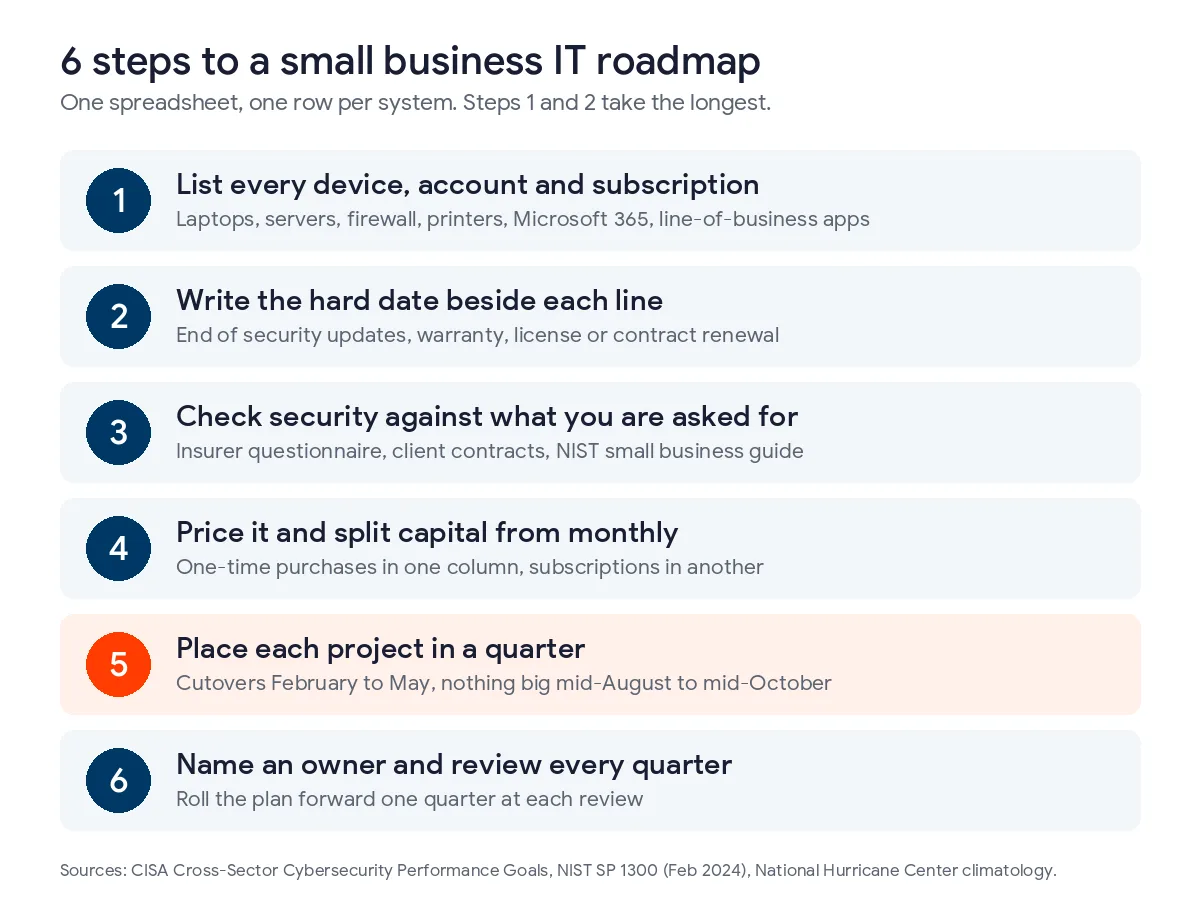
Step 3 is where a lot of small companies get stuck, because there’s no obvious standard to measure against. NIST wrote one for exactly this situation. Its Small Business Quick-Start Guide for version 2.0 of the Cybersecurity Framework fits each area on a single page, and NIST suggests using it to start a conversation with an outside provider about the parts you don’t feel ready to handle. If you have more than 20 employees and keep customer data, also check where you fall under Texas SB 2610. Our Texas SB 2610 compliance guide explains the size tiers.
For step 4, keep the capital column honest. A new server, a firewall or a batch of laptops is a one-time purchase your accountant may be able to expense in the year you buy it. IRS Publication 946 covers the Section 179 and bonus depreciation rules, and it’s worth asking your CPA before you decide whether a purchase lands in December or January. Monthly costs like Microsoft 365, backup and support go in a separate column, since they don’t get cheaper by waiting.
Which end-of-support dates belong on a 2027 roadmap?
These are the Microsoft dates I’d check against every Houston small business inventory right now. Each comes from Microsoft’s own lifecycle documentation.
| Product | What happens | Date | What to plan |
|---|---|---|---|
| Windows Server 2016 | Extended support ends, no more security updates | January 12, 2027 | Migrate the server or its workloads, or budget for paid Extended Security Updates |
| Windows 10 ESU, year 2 | Year 2 coverage ends, year 3 costs twice as much | October 2027 | Replace or upgrade the remaining Windows 10 PCs before renewing |
| Windows 11 version 25H2, Home and Pro | Security updates stop for that version | October 12, 2027 | Make sure PCs take the next feature update, which is normally automatic |
| Windows Server 2019 | Extended support ends | January 9, 2029 | Put the replacement in the 2028 budget |
Windows Server 2016 is the urgent one. Microsoft’s lifecycle page for Windows Server 2016 lists extended support ending on January 12, 2027, which is about 2 months from now. The server won’t switch off that day. It just stops getting security fixes, and a file server or domain controller with no patches is the kind of thing a cyber insurance renewal will ask about. If your office still runs one, the migration belongs in this quarter, and if it can’t happen in time, paid Extended Security Updates are the bridge.
Windows 10 holdouts are the next item. Microsoft’s Extended Security Updates program charges businesses $61 per device for year 1 and doubles the price each year for up to 3 years. The years are cumulative, so a PC that joins late pays for the years it missed. Ten old PCs kept through year 3 cost $4,270 in ESU fees alone, and they’re still old PCs at the end of it.
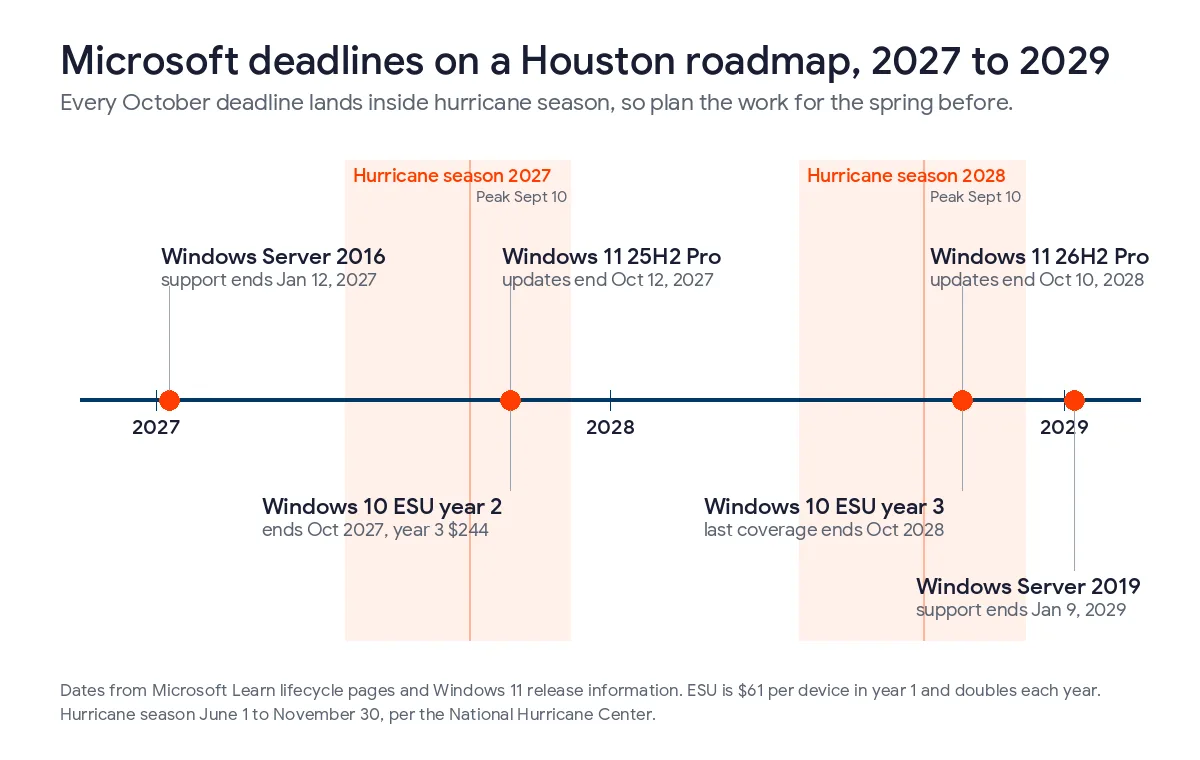
Windows 11 has its own clock. Microsoft’s Windows 11 release information shows version 25H2 losing updates for Home and Pro editions on October 12, 2027, and version 26H2 running to October 10, 2028. On a managed PC this is routine. On a PC that hasn’t checked in for months, it isn’t, and that’s usually the same PC with the outdated antivirus too.
How should hurricane season shape the schedule?
Keep the big changes out of the peak. The National Hurricane Center puts the Atlantic season at June 1 through November 30, with the peak on September 10 and most activity between mid-August and mid-October. A server migration, phone system cutover or office move scheduled for late August can be pushed back by a storm forecast, and a half-finished migration during a power outage is a bad place to be.
Beryl showed why this belongs on a technology plan and not only on a facilities checklist. It came ashore near Matagorda on July 8, 2024 as a Category 1, and the National Hurricane Center’s report on Beryl notes media accounts of 2.7 million people losing power in southeastern Texas. Offices that had moved files and phones to the cloud kept working from wherever people had power. Offices with an on-site server waited.
So for Houston I’d put cutovers and migrations in February through May, hardware for the next season, like UPS batteries and a tested backup, in place before June, and keep August through mid-October for planning and small changes. Year-end is the other crowded window, because staff take leave and accounting needs systems stable for closing. Our guide to hurricane disaster recovery in Houston covers the storm side of the plan in more detail.
| Quarter | Good for | Avoid |
|---|---|---|
| January to March | Server migrations, Microsoft 365 changes, budget approval | Anything that touches payroll or accounting in the first 2 weeks |
| April to June | Laptop refresh, firewall replacement, backup and UPS testing before June 1 | Leaving storm prep until the first named storm |
| July to September | Planning, quotes, policy and training work | Cutovers, office moves and phone system changes |
| October to December | Purchases timed for the tax year, renewals, next year’s roadmap | Large changes in the last 2 weeks of December |
Who should own the roadmap?
The owner or general manager owns the decisions. Someone with technical depth should own the dates and the prices. In a company with an internal IT person, that’s them. Without one, it’s your managed IT provider, and specifically whoever they assign as your virtual CIO. Our guide to what a vCIO does lists the roadmap as the first thing that role produces.
We include that role in every fully managed IT plan, and in Houston it’s covered on our vCIO services in Houston page. I’d still want the business owner reading the roadmap every quarter, though. A provider can tell you a server is out of support. It can’t tell you that you’re planning to hire 10 people in March or open a second location in Katy, and those plans change the roadmap more than any lifecycle date does.

If you want a starting inventory, our free network assessment produces one, along with the security gaps it finds. For the budget side, our post on how to create an IT budget for Texas businesses covers the spending categories, and plan rates are on our pricing page. Our guide to IT budget planning in Houston turns those dates into a yearly number. If you’d rather pay someone to build the roadmap, our ranking of the best IT consulting firms in Houston compares 8 local options.
What Houston owners ask about IT roadmaps
How long should an IT roadmap cover?
12 to 24 months in detail, with a short list of known dates beyond that. Hardware lasts 4 to 6 years, so the long-range part can be one line per item. Review it every quarter and roll it forward a quarter each time.
Can a 10-person company skip this?
You can skip the formal document, but not the dates. Even a very small office has a router, a few laptops, Microsoft 365 and probably a line-of-business app, and each has a renewal or end-of-support date. A single sheet with those dates, costs and an owner is enough.
What does it cost to have someone build one?
It depends on the provider and on how much of the inventory already exists. Some charge a fixed project fee and some bill hourly. Uprite includes roadmap work in its fully managed plans, so clients don’t pay for it separately.
Is the roadmap the same thing as an IT budget?
No. The budget is one column of it. The roadmap also carries the dates, the reasons and the owners, which is what tells you whether the budget is still right when something changes halfway through the year.
What should we do first if our server runs Windows Server 2016?
Find out what’s on it. Server 2016 loses security updates on January 12, 2027, and the right move depends on whether it holds files, a domain, an accounting database or an older application that needs a vendor’s help to move. Once that’s clear, you can choose between migrating to Microsoft 365, a newer server, or buying Extended Security Updates for a year while the move happens.
How quickly can Uprite help with a deadline that’s already close?
We can usually start with an inventory within days. Our average first response to a support request is 5 minutes, and planning work like a Server 2016 migration gets scheduled with your vCIO once we know what the server is doing.
Not sure what’s on your network or which of these dates apply to you? Send us a note and we’ll start with an inventory and a list of the deadlines that matter for your office. We usually reply within 5 minutes.
Talk to an IT StrategistPrefer email or a phone call? Reach the team through our contact page.