A San Antonio CPA firm secures a client portal by requiring multi-factor authentication on every login, keeping one named account per person, logging who opens what, and closing seasonal accounts the day those preparers stop working.
Most portal conversations start with the vendor’s security page. My view is that the bigger exposure sits in the logins around the portal, and it grows when preparers work from home, a client’s plant, or a laptop on a Stone Oak patio. That’s the gap. This guide covers who owns each control, what vendors really publish, and how a seasonal workforce changes the job. It’s one piece of our wider look at IT services for accounting firms in San Antonio.
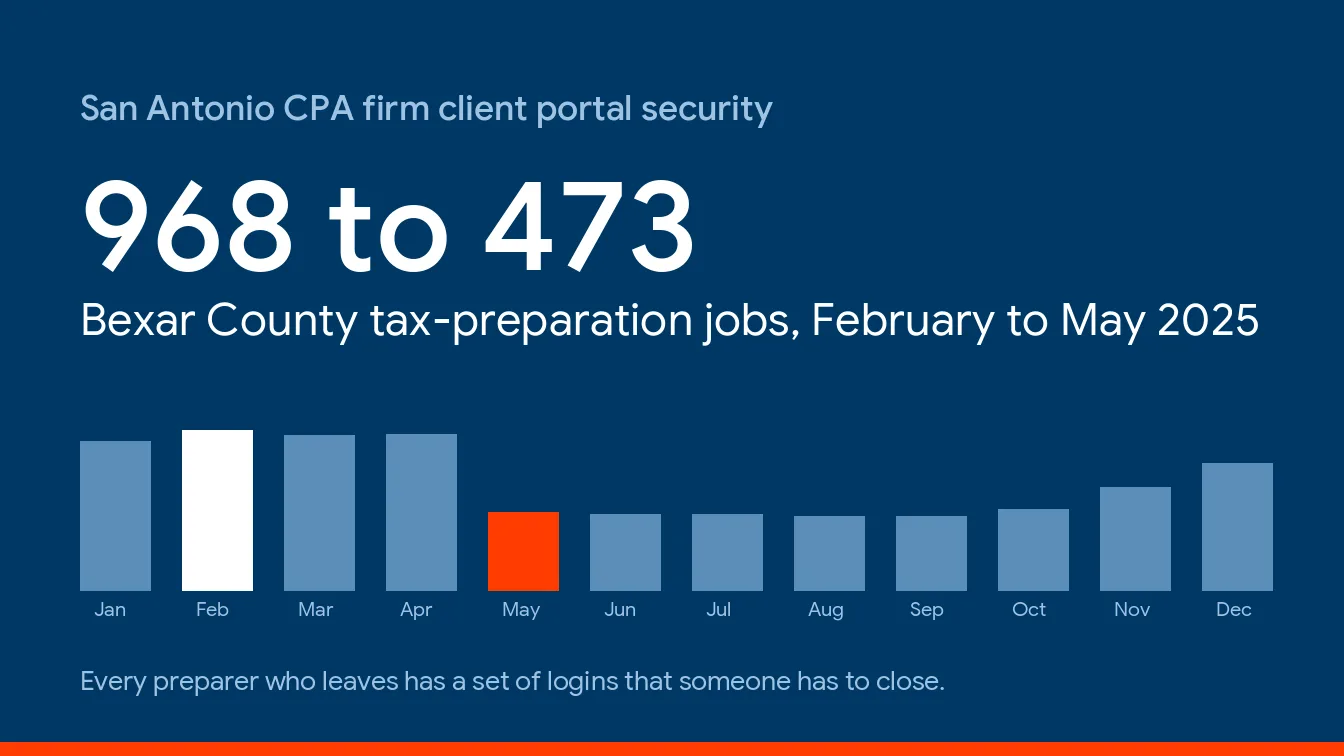
Portal security splits into 2 halves. The vendor owns encryption and hosting, and the firm owns who logs in. The FTC Safeguards Rule requires multi-factor authentication, encryption, and vendor oversight from tax preparers of any size, with narrow written-alternative exceptions for the first two. In Bexar County, tax-preparation employment fell from 968 jobs in February to 473 in May 2025, so closing seasonal logins is a yearly job, not a one-time one.
What makes a client portal secure for a CPA firm?
A secure client portal is a login-protected place where a CPA firm and its clients exchange tax documents without email attachments. It encrypts files in transit and at rest, requires multi-factor authentication, gives every person their own account, keeps an activity log, and deletes files on a schedule the firm sets.
Why does the IRS care how files move? Because plain email is a weak way to move a return. Publication 4557, the IRS guide to safeguarding taxpayer data, says to send only password-protected, encrypted documents by email, or to use Secure File Transfer Protocol instead. A portal is that advice made usable for clients who’ve never heard of SFTP. Simple as that.
It likely makes the vendor your service provider under the rule. That matters next.
Who owns portal security, the vendor or the firm?
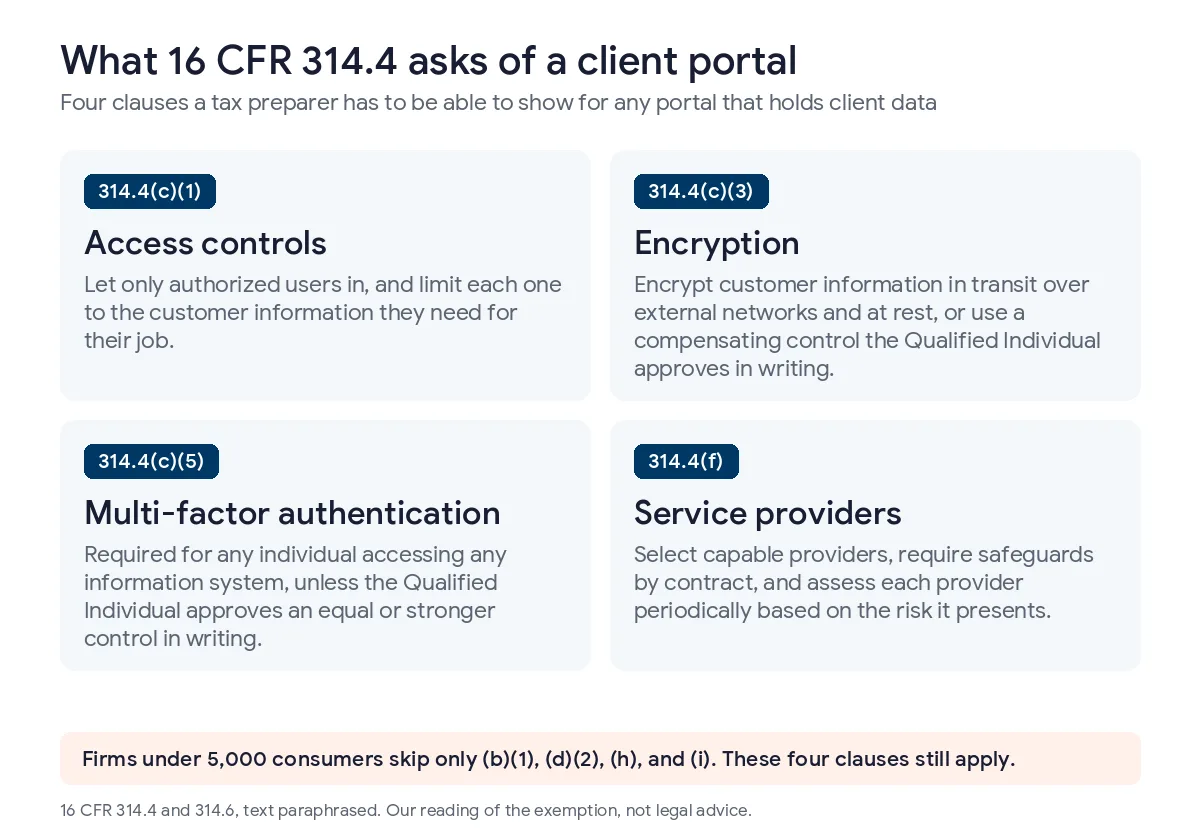
Both, and the Safeguards Rule splits the job in 3. Under 16 CFR 314.4(f), a tax preparer has to take reasonable steps to pick service providers that can protect customer information, require those safeguards by contract, and periodically assess each provider based on the risk it presents. Select. Contract. Reassess. A firm that stops after the first one hasn’t finished.
| Control | The portal or software vendor | Your firm | How you check it |
|---|---|---|---|
| Encryption in transit and at rest | Provides it | Gets the claim in writing and notes what it covers | Vendor security page and contract |
| Multi-factor authentication | Offers it, sometimes enforces it | Turns it on for every staff login and, per our reading, client logins too | A screenshot of the admin setting |
| Account ownership | Stores the accounts | Keeps one named account per person, no shared logins | A user export every quarter |
| Activity log | Records access | Reviews it when a client disputes something | Ask for a sample log |
| File retention and deletion | Supplies a setting | Chooses the schedule and applies it | Admin settings page |
| Departing staff | Nothing | Closes accounts the same day | An offboarding ticket |
| Independent audit report | Publishes one, or doesn’t | Requests it and files it with the contract | The report itself, with its date |
Look at one row twice. The rule requires multi-factor authentication for “any individual accessing any information system,” unless your Qualified Individual approves an equal control in writing. Does a client viewing their own return count, given that the IRS guide says to require it for anyone accessing customer information on your system, and 314.4(c)(1) separately mentions customers reaching their own information? It’s a fair question. Our reading is to turn it on for clients too. Confirm that with counsel.
What do portal vendors publish about their own security?
We read the public security pages of 2 well-known portals, Drake Portals and SmartVault, on November 2, 2026. We haven’t audited either product. Everything below is the vendor’s own marketing claim, and a “not mentioned” cell means the page didn’t say, not that the control is missing.
| What you’d want to see | Drake Portals product page | SmartVault security page |
|---|---|---|
| Encryption at rest | Stated, files are encrypted during transfer and at rest | Stated, AES-256 |
| Encryption in transit | Stated | Stated, over an encrypted channel |
| Multi-factor authentication | Not mentioned on the page | Stated as enforced platform-wide |
| Independent audit report | None named on the page | SOC 2 Type 2 stated |
| Access or activity log | Not mentioned on the page | Activity log stated |
Slow down. Read the table before you read anything into it. The product page doesn’t mention it, but Drake’s knowledge base has an article on multi-factor authentication for Drake Portals, so the page undersells the product. Ask the vendor and read the documentation, not just the marketing page. Both sources are linked, Drake Portals and the SmartVault security page, so you can check whether they’ve changed.
I’m not ranking them. A vendor that publishes more isn’t automatically safer. But a vendor that says nothing about a control hands the question to you, and 314.4(f) says you’re the one who has to ask, so the sensible move is a short email to the vendor with 3 or 4 specific questions, sent before tax season starts. Put it in writing. File the answer.
Does cloud tax software change what you secure?
It moves the perimeter. When tax software, a hosted desktop, or a portal lives in a vendor’s environment, the login is the front door, and a stolen password opens it from anywhere. Cloud tax software security comes down to that login. The IRS tells preparers to always enable multifactor authentication within tax software products and cloud storage services, and Publication 4557 warns that thieves pose as the provider to steal credentials.
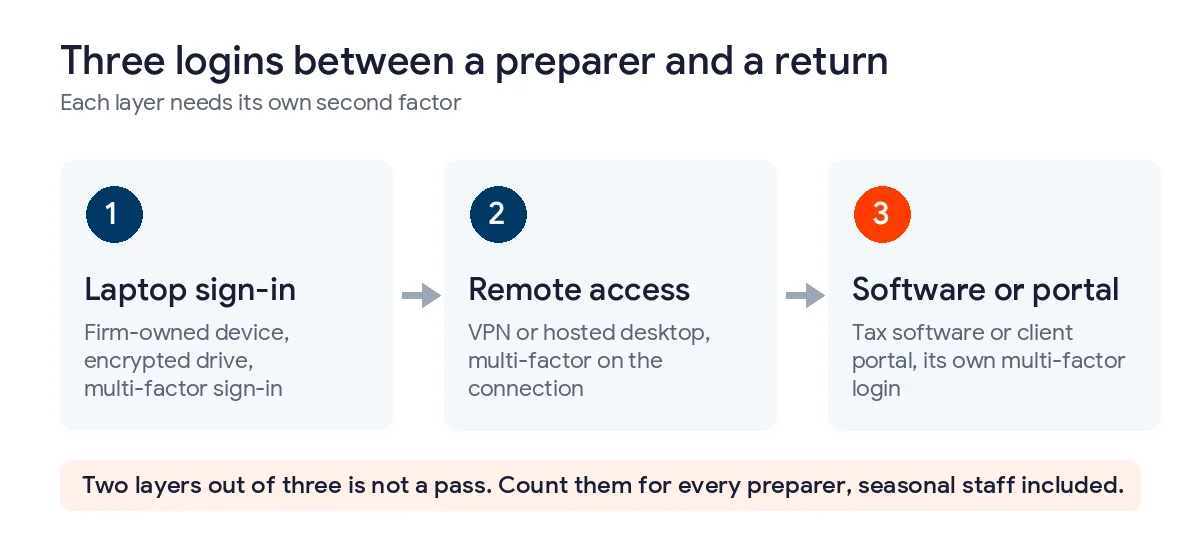
Count the layers between a preparer and a return. First the laptop sign-in. Then remote access, whether a VPN or a hosted desktop. Then the tax software or the portal itself. Each one is its own login, and each needs its own second factor. Two of 3 isn’t enough.
Vendors carry duties too. Publication 4557 says online providers must follow the 6 security and privacy standards in IRS Publication 1345, so ask any online tax software vendor how it meets them and keep the answer. Uprite supports Lacerte, ProSeries, QuickBooks, and Sage, including multi-user hosting and permissions, though a bug inside the software still belongs to its vendor.
What does remote access security look like for a San Antonio accounting firm?
It looks like a floor, and the IRS has written it down. A San Antonio preparer might work from an Alamo Heights office on Monday, a client’s plant on Tuesday, and a spare room in Boerne at night, and each of those places needs the same files, the same software, and the same security rules applied the same way. Publication 4557 says multi-factor authentication and a secure VPN should be the minimum standard for remote access to the firm’s network. It also says not to use public Wi-Fi for business email or sensitive documents. Plain enough.
Then comes the laptop. Section 314.4(c)(3) requires encryption of customer information both in transit over external networks and at rest, unless your Qualified Individual approves another control in writing. A stolen laptop with an unencrypted drive is exactly the exposure that rule addresses. Encrypt it. The IRS guide also notes that some firms issue laptops to remote employees to control the environment.
My take is firm-owned laptops for anyone who touches returns. A personal machine can work, but only with antivirus, drive encryption, multi-factor sign-in, and a written telecommute policy, and the written policy is the piece that’s easiest to put off.
What happens to every login when tax season ends?
They pile up. Then they get closed. Bureau of Labor Statistics Quarterly Census of Employment and Wages data shows Bexar County tax-preparation offices employing 968 people in February 2025 and 449 in August, a swing of 519 jobs, or 116% above the August low. Between April and May alone the count fell from 941 to 473, a loss of 468 jobs in 1 month. It climbed back to 771 by December.
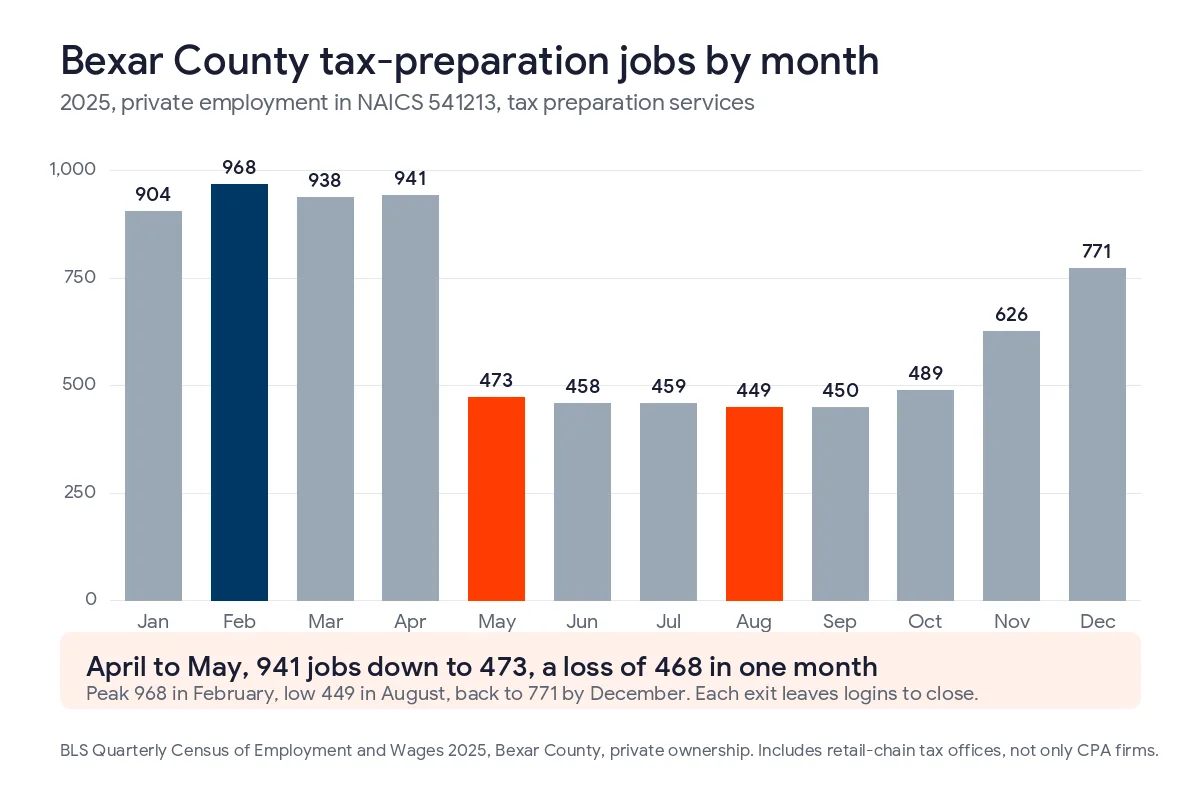
That series covers tax preparation services as a whole, so it includes retail-chain offices and not only CPA firms. CPA offices are steadier, at 3,176 jobs in January and 2,892 in December. Your own swing may be smaller. But if you add 5 or 10 preparers each January, you close 5 or 10 sets of accounts each May. Count yours.
Every person who leaves holds a set of logins. Email. A tax software seat. A portal account. An e-signature account. Remote access. A phone with mail. Publication 4557 says to prevent terminated employees from reaching customer information by deactivating their passwords and user names immediately, so our closing order below starts with the accounts that can reset all the others.
- Disable email and the mobile device first, since that’s where password resets land.
- Remove the VPN or remote access account.
- Deactivate the tax software seat and the portal account, and reassign any open client conversations.
- Close the e-signature account and any shared storage links the person created.
- Where available, check the weekly EFIN and PTIN return counts, because Publication 4557 says to review them weekly and deactivate unused EFINs.
- Record who closed what, and when.
It’s an annual job. Put it on the calendar. Uprite’s offboarding checklist reaches tax software, portals, and phones as well as the inbox, since those are the accounts nobody remembers.
Why is email still the weak point around a secure portal?
Because attackers follow the clicks. IRS release IR-2025-88 counted nearly 300 data breaches reported by tax professionals in the first half of 2025, affecting as many as 250,000 clients, and it describes fraudsters posing as prospective clients to push malicious attachments and links. Publication 4557 adds that the sender may pose as your tax software provider, your data storage provider, or the IRS. The FBI’s 2025 Internet Crime Report puts business email compromise at about $3.05 billion in reported losses.
Here’s my take. Your portal’s notification email is the best phishing template an attacker will ever get, because clients are trained to click it in March. So tell clients the exact sender address and subject line, tell them you’ll never ask for a Social Security number by email, and tell them to phone you about any new-client attachment before opening it. The IRS guide says the same about unknown senders. A short call is cheap.
Do small firms get out of the portal rules?
Not the ones that matter. Section 314.6 exempts firms holding customer information on fewer than 5,000 consumers from 4 provisions, which include the written risk assessment, the testing clause, the written incident response plan, and the annual report to the board. It leaves multi-factor authentication, encryption, access controls, service provider oversight, and the FTC breach notice clause in place. By our reading, a 4-person shop owes its portal the same controls as a 40-person one. That’s our reading, not legal advice.
For what the testing clause costs when it does apply, see our guide to accounting firm IT costs in San Antonio. For who enforces each rule, read our piece on IRS cybersecurity requirements for CPAs.
What should you ask a portal vendor or IT provider before April?
7 questions. Put them in writing and file the answers next to the contract.
- Does every login, staff and client, require multi-factor authentication, and can I see the setting?
- Where is client data stored, and is it encrypted in transit and at rest?
- Can I get an independent audit report, and when was it issued?
- What does the activity log record, and how long is it kept?
- How do I delete a client’s files, and what happens to them if I cancel?
- How fast will you tell me about a breach on your side?
- Who closes seasonal accounts, how fast, and who verifies it?
Question 7 is where managed IT earns its keep. Say a preparer quits on a Wednesday. Somebody has to know which logins that person held and close every one by Thursday. That’s the job of Uprite’s offboarding checklist, and it sits alongside multi-factor authentication on firm-managed devices and conditional access in Microsoft 365. Fully Managed starts at $138 per user per month, with portal and tax software licenses billed separately. If you already employ an IT person, co-managed IT in San Antonio runs from $100 per user. Hold any proposal you’re comparing up against Uprite’s published plan prices.
Client portal security questions from San Antonio CPA firms
Do CPA firms have to use a client portal?
Not by name. The Safeguards Rule requires encryption of customer information in transit over external networks, and the IRS tells preparers to send encrypted files or use SFTP instead of plain email. A portal is the practical way to meet both, though a compensating control approved in writing can also work.
Does the Safeguards Rule require clients to use multi-factor authentication?
The rule requires it for any individual accessing any information system, and the IRS says to require it for anyone accessing customer information on your system. That points toward including clients. It’s our reading, not legal advice, so confirm it with counsel before you decide.
Is Drake Portals secure enough for client files?
Drake’s product page says files are encrypted during transfer and at rest. It doesn’t mention multi-factor authentication, an activity log, or an independent audit report. That doesn’t mean they’re missing, since Drake’s knowledge base documents multi-factor authentication for Portals. Ask Drake. Get it in writing. File the answer.
What should a portal vendor contract say?
Section 314.4(f)(2) requires safeguards by contract. Ask for a written encryption statement, multi-factor authentication on every login, a breach notice deadline, a copy of the latest independent audit report, and a data return and deletion clause for the day you leave. Counsel should read it.
How fast must a firm report a portal breach?
It depends on the firm. An Authorized IRS e-file Provider reports a security incident to the IRS as soon as possible, and no later than the next business day after confirming it, under Publication 1345. Other preparers go through their IRS Stakeholder Liaison. Separately, 314.4(j) requires FTC notice within 30 days of discovering a breach of unencrypted information on 500 or more consumers, and Texas adds its own deadlines. Ask counsel which apply.
Can preparers work from home on personal computers?
Technically yes, but I’d rather not. A home desktop shared with the family is close to impossible to vouch for, so I’d hand out firm laptops instead. If a personal machine can’t be avoided, it still needs an encrypted drive, antivirus, and a second factor at sign-in, and the telecommute policy should say so in writing.
When should seasonal accounts be closed?
The same day, and I mean the same day. Publication 4557 says to deactivate a departing employee’s passwords and user names immediately, and a Tuesday resignation shouldn’t leave a working portal login until Friday. A week later, look at your EFIN and PTIN return counts for anything you didn’t file.
Who still has a login from last April? If you can’t answer that in a minute, send us your portal, your tax package, and your January headcount, and we’ll go through the list with you, find the stragglers, and quote the cleanup next to what you pay today.
Review My Firm's LoginsThe rest of the stack sits on our IT services for CPA and accounting firms page, and monitoring costs are in the San Antonio cybersecurity cost guide.