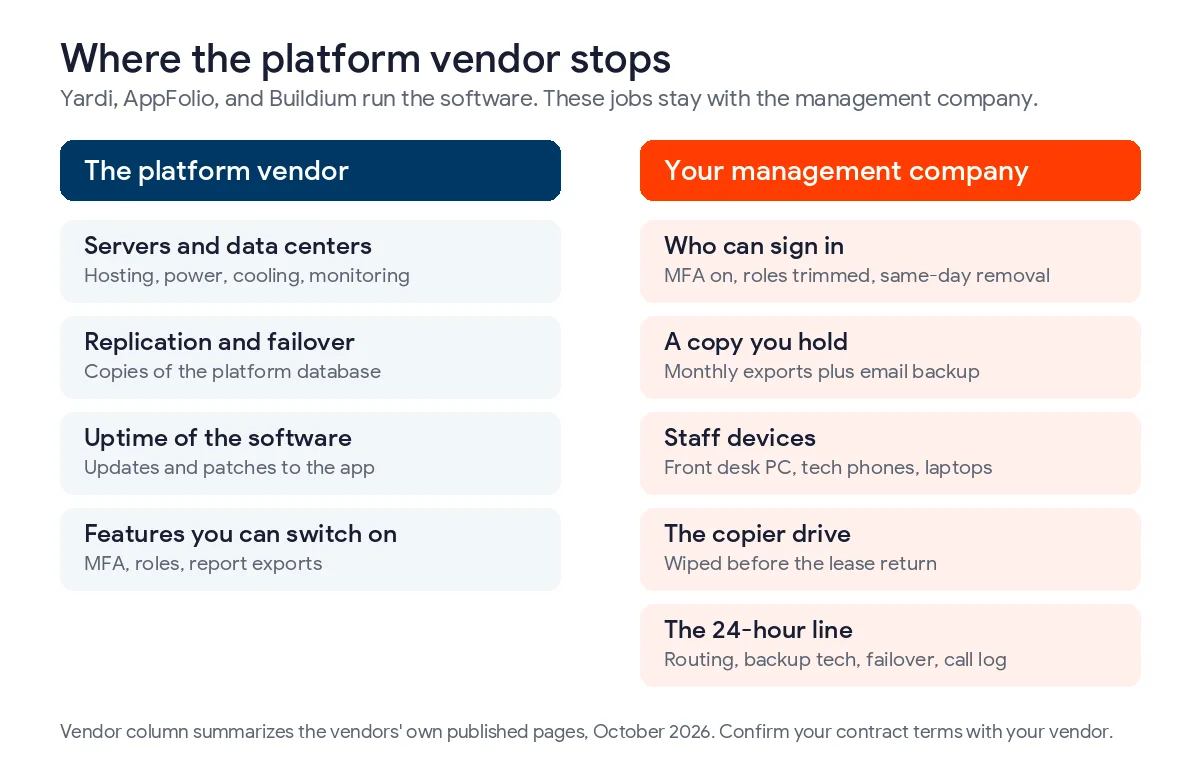
IT support for a Dallas property management company is the work your Yardi, AppFolio, or Buildium contract leaves with you, from logins and data copies to staff devices and the night maintenance line. The vendor runs its servers. The rest is on you.
This guide is for firms that manage rentals, apartments, and associations around Dallas-Fort Worth. Brokerages have a different problem, and our main page on IT services for real estate firms in Dallas covers that side. Here we stick to property management IT support in Dallas and the 6 steps we’d take with a new management client, in the order we’d take them, whether that client runs 40 single-family homes or a few thousand apartment units. None of it needs a server room. Most of it needs a decision from whoever owns the company. Those decisions cost nothing.
Your property management platform keeps its own systems running, and Yardi, AppFolio, and Buildium each describe real redundancy. What they don’t do is decide who can log in, hold a copy of your records outside their walls, wipe the copier before it goes back to the leasing company, or answer a burst pipe call at 2 a.m. Texas law puts an emergency line on the landlord, answered 24 hours a day where there’s an on-site office, and a breach notice duty on whoever owns the tenant data.
What Does IT Support for a Property Management Company Cover?
IT support for a property management company covers 4 things the software vendor doesn’t. That’s who can sign in to the management platform, a copy of your data that you control, the laptops, phones, and copiers your staff touch, and the phone system residents call after hours. A good provider also writes down what to do when tenant data leaks.
It isn’t help desk tickets alone. Password resets matter, sure. They’re just not the risk. But the costly failures we see in this industry happen between systems. A leasing agent leaves and still has the AppFolio app on her phone. A maintenance tech texts photos of a resident’s ID to a personal number. The after-hours line rings a cell phone that died on Friday. Nobody notices until Monday.
How Many Property Management Offices Are in Dallas-Fort Worth?
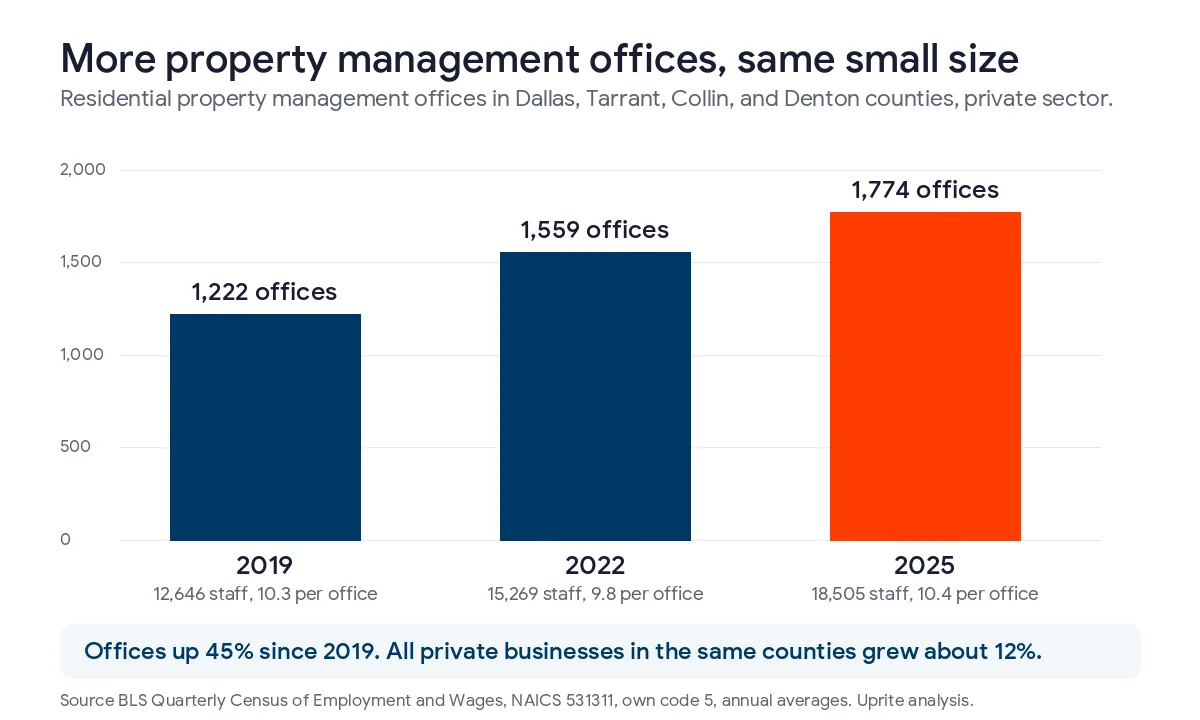
More than there used to be. And they’re small. We pulled the federal Quarterly Census of Employment and Wages for Dallas, Tarrant, Collin, and Denton counties. In 2025 those 4 counties averaged 1,774 private residential property management offices with 18,505 people on payroll. That’s 10.4 people per office. Small shops, mostly.
| County (2025 annual average) | Residential property management offices | Employees | Staff per office |
|---|---|---|---|
| Dallas | 872 | 11,572 | 13.3 |
| Tarrant | 444 | 3,251 | 7.3 |
| Collin | 272 | 2,493 | 9.2 |
| Denton | 186 | 1,189 | 6.4 |
| 4 counties combined | 1,774 | 18,505 | 10.4 |
| Nonresidential managers, 4 counties | 662 | 6,380 | 9.6 |
Source is BLS QCEW, private ownership, NAICS 531311 and 531312. The count of residential management offices rose from 1,222 in 2019 to 1,774 in 2025, up 45%. All private businesses in the same counties grew about 12% over those years. So the number of management offices has grown almost 4 times faster than the local economy. That’s a lot of new offices.
What does that mean for IT? In the 10-person offices we work with, nobody has IT in their title. Nobody. It lands on the office manager, or on the owner’s nephew who “knows computers.” Only Dallas County averages more than 12 staff per office. In Tarrant, Collin, and Denton the typical shop is smaller than that, and that’s the crowd this process is built for.
How Do You Set Up IT Support for a Dallas Property Management Company?
Here’s the order we work in. It matters. Each step depends on the one before it, so skipping ahead tends to cost you twice.
- Find every place tenant data lives.
- Control who can sign in to Yardi, AppFolio, or Buildium.
- Keep a copy of your records that you own.
- Clean up the devices staff use, including the copier.
- Build an after-hours maintenance line that actually answers.
- Write the breach plan before you need it.
Step 1. Find every place tenant data lives
Start with a list, not a product. A plain spreadsheet works. Tenant data in a management company is never only in the platform. It’s in email attachments, in the downloads folder of whoever ran last month’s rent roll, and on the scanner’s hard drive. Yes, the scanner. It’s in screening reports, in vendor W-9s, and in photos on a tech’s phone.
Why does the list matter? Texas law cares about the combination. One field alone is rarely the problem. Under Business and Commerce Code 521.002, a name plus a Social Security number, a driver’s license number, or a bank account number with its access code is sensitive personal information when it isn’t encrypted. A rental application with a Social Security or driver’s license number already qualifies. Simple as that. So does a scanned lease packet that includes one, sitting in somebody’s inbox.
Screening reports are different. They carry a second rule. The FTC says plainly that tenant background check reports are consumer reports, and a landlord has to dispose of them securely when it’s done with them. That covers the report and anything copied out of it.
Step 2. Control who can sign in to Yardi, AppFolio, or Buildium
Your platform is the system of record, and its front door is a username. Turn on multi-factor sign-in for every account. Owners included. AppFolio says its platform supports multi-factor authentication and role-based access controls. That’s a feature you have to configure, not a promise that it’s on for your staff. Check the setting.
Then look at roles. A leasing agent doesn’t need owner distributions. A maintenance supervisor doesn’t need bank details. Cut both. Every extra permission is something a stolen password can reach.
Turnover is the hard part. Always has been. Leasing staff change often, and in offices we take over, the person who left on Friday is still in the portal on Monday, because nobody owns the job of turning access off. Build 1 removal checklist that covers the platform, email, the phone app, shared drives, and door codes, and run it the same day the person leaves, before their last paycheck is even cut. Our guide to agent onboarding and offboarding IT in Dallas walks through that checklist for brokerages, and most of it carries over.
Step 3. Keep a copy of your records that you own
This is where firms assume too much. It’s an easy mistake. The vendors do back up their own systems, and they say so. What you want to know is whether you could pull your data out yourself on a bad day. Test that once.
| Platform | What the vendor says it does | What you can pull out yourself | Ask in writing |
|---|---|---|---|
| Yardi Voyager (Yardi Cloud) | Each database is replicated on a parallel server with automatic failover and point-in-time restore | Add-on modules Yardi lists for Voyager, such as Replicate and Data Connect. Confirm what each includes | What will you restore for us, how far back, how fast, and at what fee? |
| AppFolio Property Manager | Data backed up across multiple secure environments with redundancy | Report exports, and what AppFolio calls secure export functionality | Which records can we export in bulk, and in what format? |
| Buildium | Not described on the export help page | Settings, then Export Data, for rentals, associations, accounting, tasks, and communication, as .xlsx files | How do we get the ledger detail that isn’t in the export files? |
Sources are the vendors’ own pages, Yardi Cloud Services, AppFolio accounting and reporting, and Buildium’s export help article. That last one is honest about a gap. Credit to Buildium. Buildium says it doesn’t provide export files for all ledger financials, so the accounting detail has to come out through reports.
Here’s our honest take. Don’t overbuy. A 10-person firm doesn’t need to buy a backup product for its management platform on day 1. A monthly export of rentals, tenants, owners, and general ledger reports into a locked folder in your own Microsoft 365 tenant gets you most of the way there, and it costs little more than a short block of someone’s time each month. The vendor’s replication protects against the vendor’s bad day. Your export protects against yours, like a fired employee deleting records or a billing dispute that locks you out.
Email is different. It really needs a backup service. Owner statements, lease negotiations, and vendor invoices live in mailboxes, and no platform export touches them. We usually set that up alongside managed cloud services in Dallas, with the export folder and mailbox backups in the same retention plan, so 1 person can tell an owner exactly how far back you can go.
Step 4. Clean up the devices staff use, including the copier
Plenty of leasing offices share 1 front desk computer and 1 big copier. Both hold more tenant data than people think. The copier is the one that bites. Here’s why.
Many offices lease their copiers, and a copier can keep scanned pages on an internal drive. The FTC’s Disposal Rule counts handing back equipment that holds screening data as disposal. Under 16 CFR Part 682, transferring any medium that stores consumer information, including computer equipment, is a disposal, and one reasonable measure the rule names is erasing or destroying that media so it can’t be read. Texas adds its own version for customer records in section 521.052, which lists shredding, erasing, or otherwise making the data unreadable. Put a drive wipe certificate in the copier return checklist. Get it in writing.
Field staff need the same thinking. Maintenance techs take photos inside units, open work orders, and sometimes see a resident’s paperwork on a counter. Give them company-managed phones, or enroll their personal phones so work apps can be wiped without touching family photos. And keep resident ID photos out of personal text threads. No exceptions.
Step 5. Build an after-hours maintenance line that actually answers
Texas sets the floor here. It’s short. Under Property Code 92.020, a landlord with an on-site management or superintendent’s office has to give tenants a phone number answered 24 hours a day for emergencies that materially affect the physical health or safety of an ordinary tenant. The number has to be posted prominently outside that office. A landlord without an on-site office still has to give tenants a number for reporting those emergencies.
The statute puts that duty on the landlord, which the Property Code defines to exclude the manager, unless the manager holds itself out as the owner or lessor in the lease. In practice, though, the management company is the one whose phone rings. If it doesn’t get answered, your client is the one exposed, and that’s an awkward call to have with an owner.
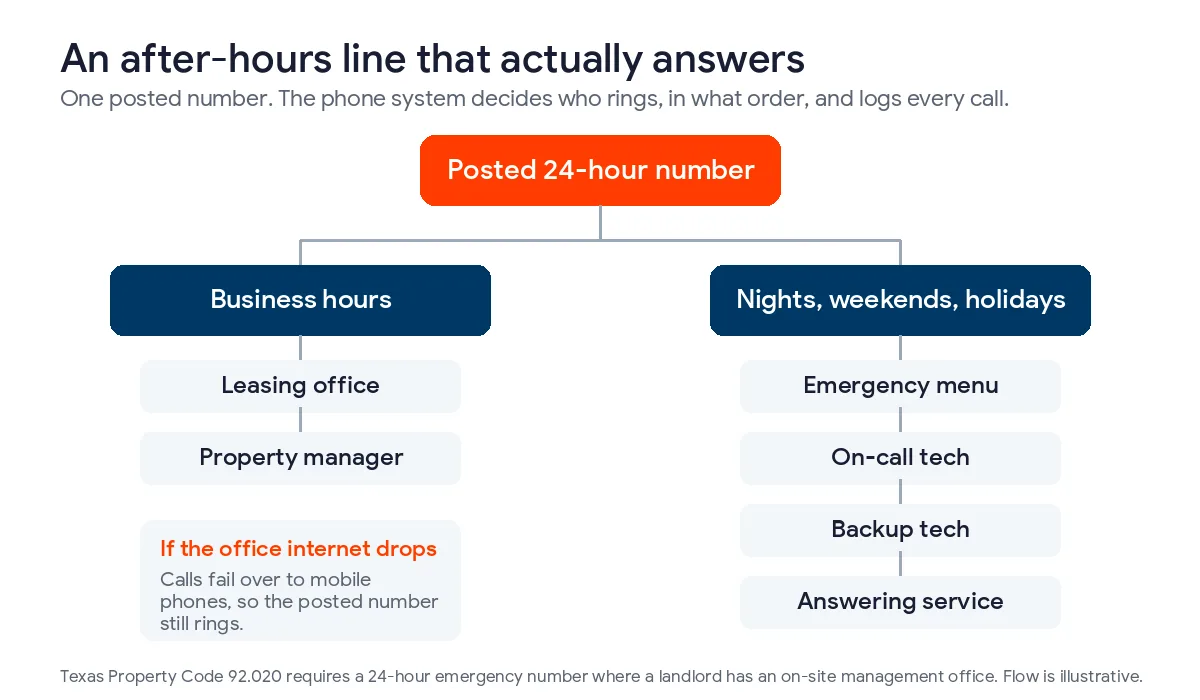
One cell phone isn’t a system. It dies, it goes to voicemail, and it leaves with the person who carries it. A cloud phone system can route the posted number by time of day, ring the on-call tech first, roll to a backup tech after a set number of rings, and send overflow to an answering service. It also keeps a call log, which is the record you’ll want when an owner asks who called about the water heater, when they called, and how long it took the tech to call back.
| What happens | What the phone system should do |
|---|---|
| Business hours | Ring the leasing office, then the property manager |
| Evenings, weekends, and holidays | Play an emergency menu, then ring the on-call tech’s phone |
| On-call tech doesn’t pick up | Roll to a backup tech, then to the answering service |
| Office internet goes down | Fail over so calls reach mobile phones anyway |
| Staff change | Update the on-call schedule in 1 place, without changing the posted number |
We set that kind of routing up through business VoIP in Dallas. North Texas storms are the reason failover is on the list. The night the power goes out is the night residents call. Every time.
Step 6. Write the breach plan before you need it
Texas gives you 2 clocks once you determine a breach happened. Both are firm. Under section 521.053, affected people must be told no later than the 60th day. If 250 or more Texans are involved, the Attorney General must hear within 30 days.
Property managers have a third question that’s easy to miss. The same section says a business holding sensitive data it doesn’t own must tell the owner of that data immediately. Whether the tenant files belong to you or to the owner you manage for is something your management agreement and your attorney should settle now, in writing, rather than in the middle of an incident.
This isn’t theoretical. Not in this industry. We read the Texas Attorney General’s breach list for October 17, 2025 through October 16, 2026. Of 659 notices, 3 came from firms that own or manage apartment and commercial property, and together they covered 18,637 Texans. All 3 listed Social Security numbers. And 2 of them listed driver’s license numbers. The list doesn’t say whether those were residents or employees, but it does show what a property company’s files hold.
Keep the plan to 1 page. Really, 1 page. Who decides it’s a breach, who calls the cyber insurer, who calls the owners, and where the contact list lives if email is down. Then test it once a year. Put it on the calendar.
What Does It Cost to Outsource IT for a Property Management Office?
For a Dallas management office it comes down to remote-only support or a plan that includes on-site visits. On our published pricing, remote-only IT Essentials starts at $91 per user per month and Fully Managed IT with on-site support starts at $138. The $110 IT Pro plan is remote-only and starts at 12 employees, which the average office in Tarrant, Collin, and Denton counties doesn’t reach.
Platform fees, phone lines, and licensing sit on top of that. We break those numbers down in our guide to what real estate IT costs in Dallas.
Where Do Property Managers Get IT Wrong?
The mistake we see most is treating the vendor’s security page as the company’s security program. Yardi, AppFolio, and Buildium can secure their data centers. They can’t stop your former leasing agent from signing in with a password she still remembers.
The second is over-buying. Plenty of small firms are sold servers, firewalls sized for a hospital, and a backup tool for a platform that already replicates itself, all before anyone has turned on multi-factor sign-in for the management software. Spend first on sign-in controls, email backup, and the phone line. Those 3 cover the failures we see most. Start there.
The third is waiting. It’s the expensive one. Every one of these steps is cheaper on a quiet Tuesday than the morning after an owner calls about a leaked rent roll, or a resident says nobody answered when they reported a gas smell.
Questions Dallas Property Managers Ask About IT
Does AppFolio or Yardi back up our data, so we don’t have to?
They back up their own platforms, and both describe redundancy and replication. That protects you when the vendor has an outage. It doesn’t give you a copy you control if an employee deletes records or an account gets locked, so schedule your own exports and back up email separately.
Do Texas landlords have to answer maintenance calls 24 hours a day?
Landlords with an on-site management or superintendent’s office do. Property Code 92.020 requires a number answered around the clock for emergencies that materially affect physical health or safety, posted outside that office. Other landlords must still give tenants an emergency number, and in practice a management company often runs it for them.
Is a rental application covered by Texas data breach law?
Usually, yes. A name combined with a Social Security number, a driver’s license number, or an account number with its access code is sensitive personal information under Chapter 521 when unencrypted. Screening reports are also consumer reports under federal law, so they have to be disposed of securely once you’re done with them.
How fast must a property manager report a tenant data breach in Texas?
Within 60 days of determining the breach for affected people, and within 30 days to the Attorney General when 250 or more Texans are involved. If you hold the data for an owner who legally owns it, the statute says to notify that owner immediately, so settle data ownership in your management agreement.
Can a 6-person management office get managed IT support?
Yes. Small offices are the normal case here, since the average residential management office in Denton County has 6.4 people. A remote-only plan can cover help desk, sign-in controls, and backups, and you add on-site visits only if your leasing office needs hands-on work regularly.
Should maintenance techs use personal phones for work orders?
They can, if the phones are enrolled so company apps and data can be wiped separately when someone leaves. Unmanaged personal phones are how resident photos and IDs end up in text threads nobody controls, so set the rule before you hand out portal access.
We support Dallas-Fort Worth management firms from our office at 5757 Alpha Road in North Dallas, and our average first response time is 5 minutes. If you’d rather start with the full real estate picture, our Dallas real estate IT services page covers it, and our managed IT services in Dallas page shows the plans side by side.
We’ll map where your tenant data lives, check who can sign in to your platform, and test your after-hours line, then hand you a short list of fixes in priority order.
Book a Property IT Review