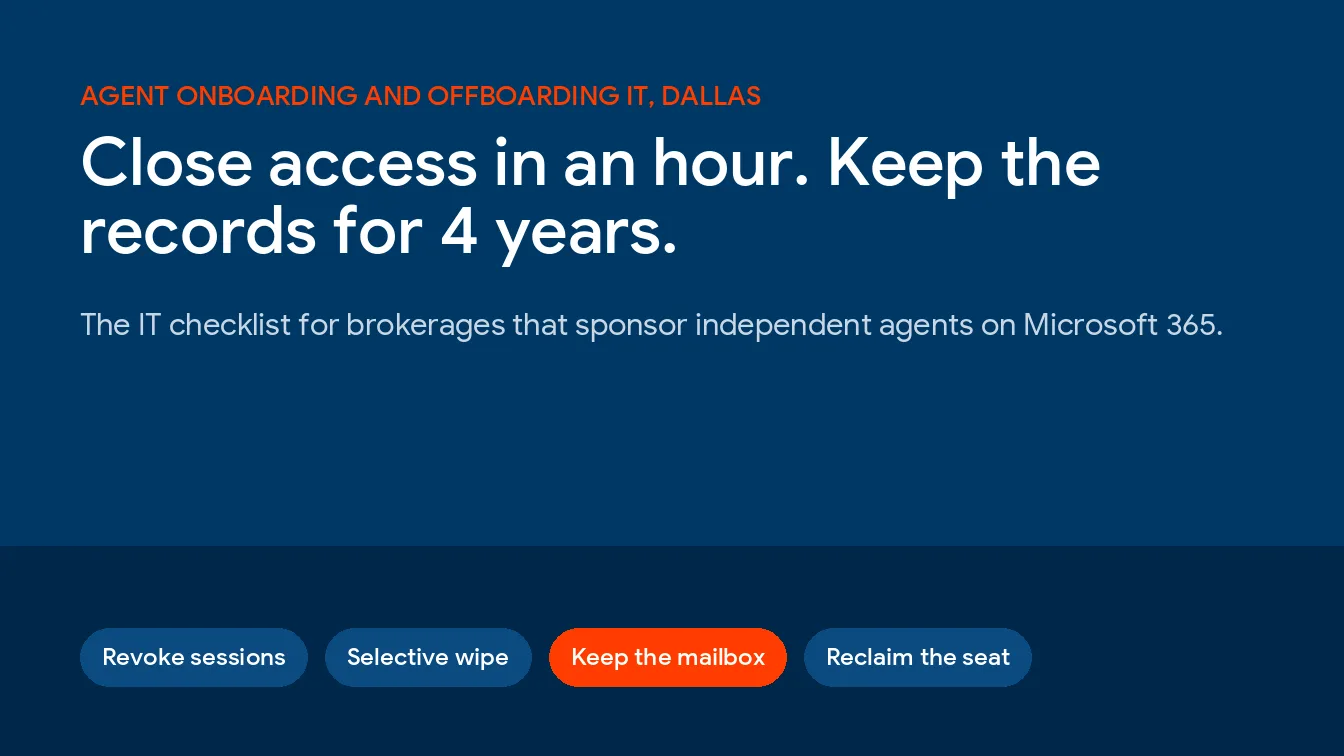
Real estate agent offboarding in Dallas comes down to 4 IT jobs on the day a sponsorship ends. Block the agent’s sign-in and kill open sessions, wipe brokerage data from their phone, keep the mailbox that TREC’s 4-year records rule depends on, and pull access to every app the brokerage pays for. Onboarding is the same list run in reverse. Get it right and offboarding is easy. Skip it and you’re guessing.
This guide is for Dallas-Fort Worth brokers and operations managers who sponsor independent agents and run the brokerage on Microsoft 365. It sits under our IT services for real estate firms in Dallas, and it covers identity and access only. Wire fraud is a separate problem with its own playbook, which we cover in our real estate IT security guide. Property managers face a different access problem, handled in our guide to IT support for Dallas property management companies.
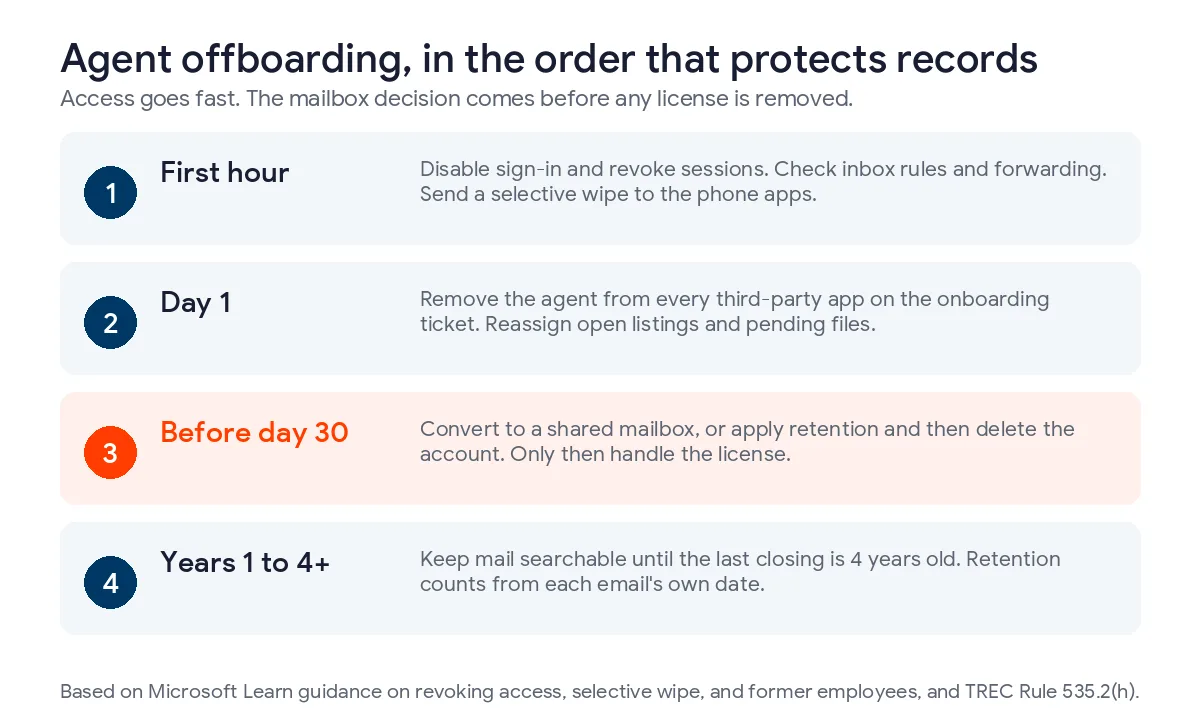
A third of active DFW sales agents started with their current broker in the last 12 months, so offboarding isn’t rare. Do it in order. Disable the account and revoke sessions in the first hour, selectively wipe the phone, and decide on the mailbox before any license comes off. Removing a license starts a 30-day deletion clock, while TREC expects records kept at least 4 years after closing or the end of the transaction. Then close every third-party app by hand.
What Is Agent Offboarding IT, and Why Does It Land on the Broker?
Agent offboarding IT is the work of removing a departing agent’s access to brokerage systems while keeping the records the broker has to hold, and under TREC’s rules those include substantive communications with the parties, most of which live in email. In Texas the sponsoring broker owns both halves. The agent leaves with a license. The broker keeps the file. And the liability.
That split is written into the rules. Under TREC Rule 535.2(h), a broker keeps transaction records for at least 4 years from the closing, the termination of the contract, or the end of the transaction, and the list runs from disclosures and contracts to commission agreements and substantive communications with the parties. Where do those communications live? Usually in the agent’s mailbox.
So the account can’t simply vanish. It has to stop working. It also has to keep existing.
How Often Do Dallas Agents Change Brokerages?
More often than you’d guess. We pulled the Texas Real Estate Commission’s own license holder file on October 20, 2026 and counted active sales agents whose TREC record lists Dallas, Tarrant, Collin, or Denton County, the 4 core counties of the metro. There were 36,184 of them. Dallas County alone had 11,903.
12,230 of those agents, or 33.8%, started with their current sponsoring broker in the previous 12 months. Strip out the 2,681 who were licensed during that same year and you still have 9,549 agents who already held a license and moved to a new broker or came back from inactive status. That’s 26.4% of the active DFW pool. Roughly 1 in 4. Half of active DFW agents have been with their current sponsor for less than 2 years.
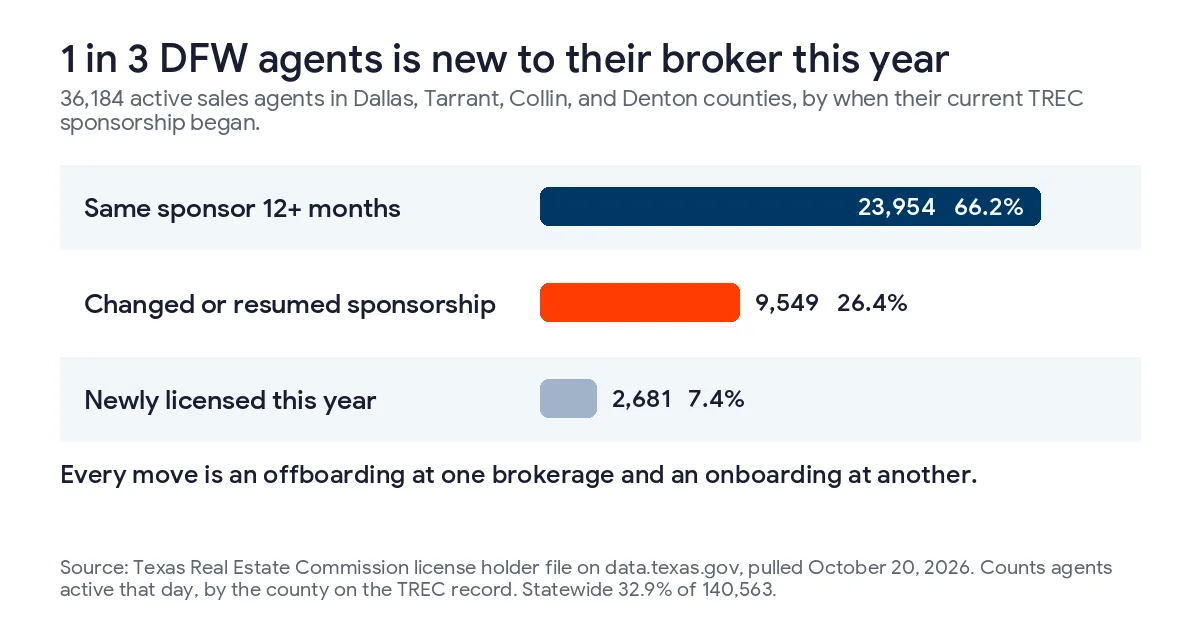
Now read that from the IT side. Every move is an offboarding at one brokerage and an onboarding at another. At that rate a 60-agent Dallas office would see roughly 16 experienced agents arrive in a year, and at least as many leave if its headcount holds steady, each one a full offboarding and onboarding cycle. Hardly an edge case. It’s a routine. Routines need an owner.
Two caveats keep the figure honest. The file only shows agents who are active today, so anyone who left the business entirely isn’t in it, and neither is an agent sitting inactive between brokers on the day we pulled it. And the county is the licensee’s county in the TREC record, not the office address. The statewide numbers agree. 32.9% of 140,563 active Texas agents are on a sponsorship less than a year old.
Size changes the picture. The median Texas sponsor has 2 agents, yet 52.6% of active Texas agents work under just 193 sponsors that each carry 100 or more. The biggest Texas brokerages, the ones carrying hundreds of agents under a single broker license, run this process every week of the year, whether or not anyone has written it down. Small ones run it rarely. That’s when steps get skipped.
Why Is Offboarding Harder With 1099 Agents?
Employees leave through HR. Agents leave through TREC. That’s the whole problem.
TREC Rule 535.121 says either side ends a sponsorship by giving the other written notice and terminating it online or on the commission’s form, and a termination filed on the form takes effect the day TREC receives the completed form. The agent’s license then goes inactive until a new broker sponsors it. TREC’s own guidance adds a detail brokers miss. When an agent moves to a new broker online, TREC doesn’t notify the old one. The written notice may be your first warning. Act on it.
Nobody files an IT ticket for that. There’s no exit interview and no badge to return, and no payroll system flips a status that kicks off a workflow, so on Monday morning the agent’s phone is still syncing brokerage email and their transaction platform login still works.
Then there’s hardware. Independent agents buy their own phones and laptops. You shouldn’t factory reset a phone you don’t own. On one you never enrolled, you can’t. The controls have to live on the account and inside the apps, which is exactly where Microsoft 365 puts them through Entra ID sign-in rules and Intune app policies. Our Texas pillar on IT services for real estate firms covers how brokerages differ from title, property management, and commercial firms on this point.
Should agents be guests or members in Microsoft 365?
Microsoft Entra ID tags every account as a Member or a Guest. Microsoft’s guest user documentation describes a Member as an insider, the kind of person on payroll, and a Guest as an outside collaborator who signs in with an identity from their own organization. 1099 agents don’t fit either label cleanly. They don’t have to. The label is a policy switch, not a legal finding about employment.
It turns on email. An agent who needs a brokerage address and a mailbox in your tenant has to be a member account with a license. A guest signs in with their own email identity, so the correspondence about your listings and your buyers lives in their system, not in yours. That might suit a team leader who runs a separate company with its own tenant. It’s a poor fit for an agent whose deal communications TREC expects your broker to keep for at least 4 years. You can’t hold what you don’t host. Custody comes first.
The Onboarding Checklist That Makes Offboarding Work
Offboarding fails at onboarding. If nobody wrote down which apps a new agent was given, nobody can take them all back. So build the departure list on day 1.
- Confirm in TREC’s records that the sponsorship is active under your broker license before granting any access.
- Create a member account with your naming convention and tag it as an agent, so groups and policies can target agents as a set.
- Assign a license from a tracked seat pool.
- Register multifactor sign-in during the first session, in person or on a call, never later.
- Apply an Intune app protection policy to Outlook, Teams, and OneDrive on the agent’s own phone.
- Create the transaction folders in a brokerage-owned SharePoint library, not in the agent’s personal OneDrive.
- Confirm the retention policy covers the new mailbox.
- Log every third-party login you create, from the transaction platform to the CRM to the e-signature account, in one ticket.
Look at step 6. Files saved in an agent’s OneDrive go with the account, and Microsoft’s former employee guidance gives you 30 days by default after deleting an account to move them before the content is deleted. Files in a brokerage library never leave. That’s the point. Step 8 matters most. It turns offboarding from a memory test into a checklist.
If your Microsoft 365 tenant isn’t set up to make these steps routine, our Microsoft 365 administration for Dallas businesses covers the tenant side. Our list of Microsoft 365 security settings Texas SMBs miss is a good place to check the basics first.
The Offboarding Checklist, Hour by Hour
Order beats speed. Pulling a license before deciding on the mailbox can destroy records. Revoking access after the agent has already copied the inbox somewhere else is too late. Run it in sequence. Skip nothing.
| When | Step | Where it happens | Why it can’t wait |
|---|---|---|---|
| First hour | Disable sign-in, then revoke sessions | Microsoft Entra admin center | Existing access tokens can last up to an hour |
| First hour | Check inbox rules and confirm external forwarding is off | Exchange admin center and Microsoft Defender | Where forwarding is allowed, a rule copies records out of the brokerage |
| First hour | Issue a selective wipe for the agent’s phone apps | Intune admin center | The wipe only runs when the app next opens |
| Day 1 | Remove access in every third-party app on the ticket | Each vendor’s admin console | Those apps keep their own sessions |
| Day 1 | Reassign open listings and pending files to the broker or another agent | Transaction platform and SharePoint | Clients still need a responsive agent |
| Before any license comes off | Choose shared mailbox or inactive mailbox, then handle the license | Exchange and Microsoft Purview | License removal starts a 30-day deletion clock |
| Until 4 years after the agent’s last closing | Keep the mail searchable, with a 5-year policy for margin | Retention policy | TREC Rule 535.2(h) sets the floor |
The first hour
Microsoft’s access revocation guidance is clear about the order. Disable the account, then select Revoke sessions on the user’s overview page. Disabling alone isn’t enough. Tokens linger. Access tokens issued by Microsoft Entra ID last an hour by default, and revoking invalidates the refresh tokens, so when an app’s access token expires it can’t quietly get a new one for an account you’ve already switched off.
Check the mailbox rules while you’re there, and confirm external auto-forwarding is switched off. Microsoft’s outbound forwarding guidance says the default became Off for new tenants and for many existing ones in 2021, but tenants that were already forwarding may still allow it. Microsoft recommends setting On or Off explicitly. Choose Off. If yours allows it, an inbox rule can send every new message, including replies from clients and title companies, to a personal address. That’s a records problem. It’s a client privacy problem too. And it’s easy to miss, because the mailbox itself looks untouched.
The first day
This part is manual. Nothing here is automatic. Microsoft can’t sign the agent out of a vendor that issued its own session. The same Microsoft page says Entra ID can’t directly revoke a session token an application issued, so each app has to end its own sessions or be deprovisioned by someone with admin rights in that app. Work the onboarding ticket line by line.
Reassign the live work, too. TREC’s guidance notes that ending a sponsorship can affect the agent’s representation in ongoing transactions. Pending files need a named person. Today.
Keep the Mailbox or Drop the License?
This is where brokerages lose records without knowing it. Microsoft’s own former employee steps say that when you remove a license, the user’s email, contacts, and calendar are kept for 30 days and then permanently deleted. Pull the seat to save money and the deal correspondence a TREC audit, a client complaint, or a lawsuit might ask for is gone a month later. No warning. No undo.
There are 2 safe paths. There’s 1 risky one.
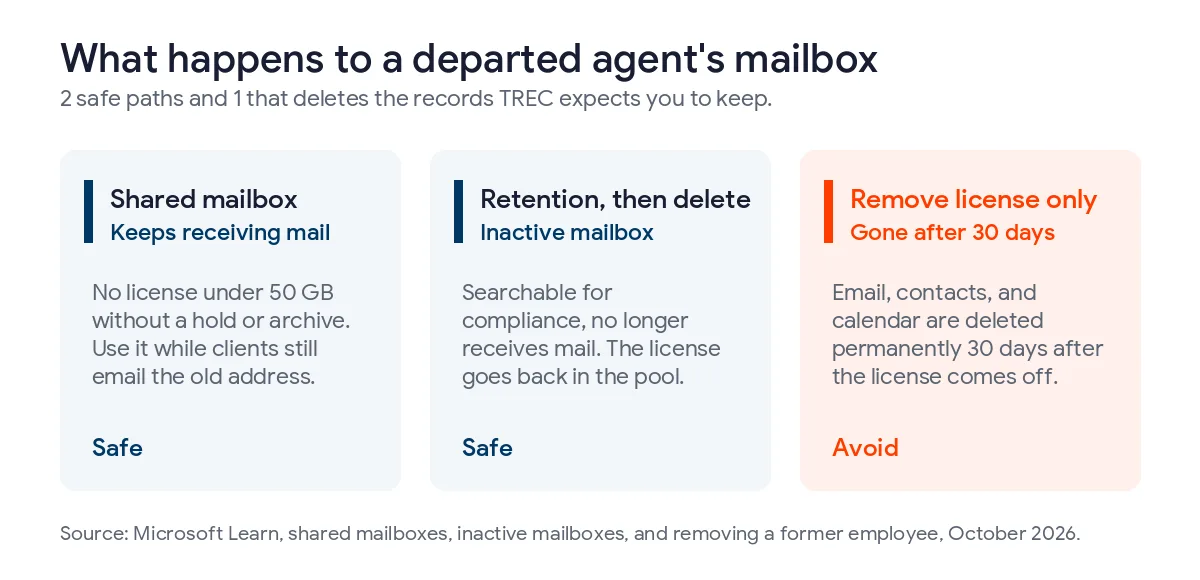
| Option | What happens to the mail | License | Fits when |
|---|---|---|---|
| Convert to a shared mailbox | Stays live and keeps receiving mail at the agent’s address | None needed under 50 GB without a hold or archive | Clients still email the old address and someone needs to answer |
| Retention policy, then delete the account | Becomes an inactive mailbox, searchable but no longer receiving mail | Freed for the next agent once the account is deleted | The work is wrapped up and you only need to keep the record |
| Remove the license and walk away | Deleted permanently after 30 days | Freed | Never, if the mailbox holds transaction email |
A shared mailbox usually needs no license. Microsoft requires an Exchange Online Plan 2 license only when the mailbox passes 50 GB, uses archiving, or sits on litigation hold. Leave sign-in blocked on the converted account, which is the same default Microsoft applies to every new shared mailbox.
An inactive mailbox is the cleaner long-term answer. Apply a retention policy. Confirm it took effect. Then delete the account. In that order. The mail stays searchable for compliance staff through Content Search, and the license goes back in the pool for the next agent who signs on.
Microsoft’s clock and TREC’s clock don’t start on the same day
This trips people up. Microsoft says a retention policy’s period is always based on the date each item was received or created. TREC’s 4 years start at the closing, the contract’s termination, or the end of the transaction. See the gap? An offer email sent in March for a deal that closes in July ages out of a 4-year retention policy 4 months before the TREC clock runs out, and nobody notices until someone asks for it.
So set it longer. Not exactly 4 years. How much longer depends on your longest realistic deal cycle, and that’s a question for your broker and your attorney, not for IT alone. A 5-year policy is a simple margin to put on the table. It costs little. A missing email file costs more.
Securing Agent Phones Without Enrolling Them
Independent agents are the purest BYOD case there is. Ask one to hand over full management of a personal phone and you’ll likely hear no. Fair enough. It’s their phone. Intune app protection policies work on phones that aren’t enrolled in any device management at all, which Microsoft describes as the typical employee-owned case and which fits a 1099 agent’s phone just as well.
The policy wraps the work apps. Not the phone. Outlook can require a PIN, block copying client data into a personal texting app, and stop attachments from being saved to personal cloud storage. Personal photos, texts, and apps stay untouched. Pair it with a Conditional Access rule that requires a protected app, so an agent can’t route around the policy by adding the brokerage account to the phone’s built-in mail app instead.
When the agent leaves, you send a selective wipe. It removes the brokerage data from the protected apps and leaves everything else alone. There’s one catch. The agent has to open the app for the wipe to run, and Microsoft says it can take up to 30 minutes after the request. So send it in the first hour. Don’t wait. Microsoft’s wipe page ties managed apps to a licensed user account, so leave the agent’s Intune license in place until the request shows as successful.
Watch 2 prerequisites. Each agent needs a license that includes Intune. And the policy has to cover the agent group from day 1, because a policy added after an agent leaves protects nothing.
The Apps Microsoft Can’t Switch Off for You
A Dallas brokerage’s agents sign into far more than Microsoft 365. List them all. Each of these keeps its own login or session, and each needs a named step on the offboarding ticket.
- The transaction management platform, where the brokerage account owns the files and the agent’s seat has to be removed or reassigned.
- E-signature accounts tied to the brokerage, where pending envelopes need a new owner.
- The CRM and lead routing system, so new leads stop going to someone who’s gone.
- MLS access, which the MLS and the local association manage outside your tenant, so the roster change has to be made there.
- Lockbox and showing apps, which control physical access to listed homes.
- The agent’s page on the brokerage website.
- Phone system extensions, shared calendars, and group chats outside Teams.
Single sign-on helps. Partly. If an app signs in through Microsoft Entra ID, disabling the account stops new sign-ins, but it doesn’t always end a session the app already issued, and each vendor sets its own session length. Deprovisioning inside the app is the only step that closes the door for certain.
What Licenses Should a Brokerage Buy for Agents?
Buy for the agents you’ll have. Not today’s roster. With about 26% of already-licensed DFW agents starting a new sponsorship in the last year, a license works better as a seat in a pool than as anyone’s property. The departing agent’s seat is the arriving agent’s seat, and the person who runs onboarding should be the same person who closes out the departures.
Microsoft’s billing pushes you the same way. Under its new commerce rules, subscriptions can only be canceled in the first 7 days of their term. Removing a license from a departed agent doesn’t stop the bill on an annual commitment, because the seat stays on the invoice until the term comes up for renewal. Reassigning it stops the waste. That’s the lever. A good offboarding ticket ends with the seat back in the pool, noted for the next hire. Seat tracking like this is routine in managed IT for Dallas businesses.
How many seats, which plan, and whether agents or the brokerage pay for them are pricing questions. They’re covered in our guide to what real estate IT costs in Dallas, including how brokerages split per-agent costs between salaried staff and the independent agents they sponsor.
Where This Checklist Breaks Down
An honest list has gaps. Here are 3 worth planning for.
Agent teams with their own tenant come first. A team leader who runs a separate company may want team members on that company’s Microsoft 365, not yours. That can work. Our Microsoft 365 migration checklist covers what moving mailboxes between tenants involves. But the brokerage then depends on another company’s settings to keep TREC records, so get the retention commitment in writing in the sponsorship agreement and confirm with counsel that it meets your broker’s TREC obligations.
Then come personal laptops. App protection policies are strongest on phones, where Outlook, Teams, and OneDrive carry the Intune controls, and they do much less for an agent who opens brokerage files in a desktop app on a laptop the brokerage has never seen. On a personal Windows or Mac laptop, the realistic controls are browser-only access to brokerage data and Conditional Access rules, not a wipe. Plan for that rather than pretending the laptop is managed.
Last is the angry exit. Nothing above recovers a file the agent downloaded to a personal drive last month, and no admin console reaches into a device you never managed. Prevention is the onboarding checklist, especially the brokerage-owned SharePoint library and the copy limits on the phone. After that, it’s a fast first hour and a clear record of what was done and when. The FBI’s 2025 IC3 report counted $3.05 billion in business email compromise losses, second only to investment fraud. A dormant agent mailbox that still accepts a password is the kind of account that crime depends on. Watching for that is part of our cybersecurity services in Dallas.
Questions Dallas Brokers Ask About Agent Offboarding
How long does a Texas brokerage have to keep a departed agent’s email?
At least 4 years from the closing, contract termination, or end of the transaction, under TREC Rule 535.2(h), for substantive communications with the parties. Because Microsoft retention counts from each email’s own date, set the retention period longer than 4 years so older deal email doesn’t expire before TREC’s clock runs out.
Can we cancel a departed agent’s Microsoft 365 license to save money?
Not safely, and often not usefully. Removing the license deletes the mailbox after 30 days unless it’s converted to a shared mailbox or placed under retention first. On annual new commerce terms, cancellation only works in the first 7 days, so reassigning the seat to the next agent usually saves more.
Should 1099 agents be guests or members in our tenant?
Agents who use a brokerage email address need member accounts with licenses, because a guest’s mailbox lives in their own system. Guest access suits team leaders with a separate company and tenant. The user type is a policy label in Microsoft Entra ID, not a statement about employment status.
Can we wipe brokerage data from an agent’s personal phone?
Yes, if the phone’s work apps were covered by an Intune app protection policy. A selective wipe removes brokerage data from Outlook, Teams, and OneDrive and leaves photos, texts, and personal apps alone. The agent has to open the app for it to run, so send it in the first hour and keep the Intune license until it completes.
How fast does access stop after we disable an agent’s account?
New sign-ins stop at once. Access tokens already issued can keep working for up to an hour, and revoking sessions stops apps from quietly renewing them. Apps that issue their own sessions, like many transaction and e-signature platforms, keep working until you remove the agent inside each app.
Does TREC tell us when an agent moves to another broker?
Not automatically when the agent moves online, according to TREC’s guidance on Rule 535.121. The agent owes you written notice, and the license goes inactive until a new broker sponsors it. Treat that notice as the trigger for the IT offboarding ticket, the same day it arrives.
For everything else a Dallas brokerage runs, from the network to the help desk, start with our Dallas real estate IT services.
Uprite builds the onboarding and offboarding runbook into a Dallas brokerage’s Microsoft 365 tenant, from agent groups and app protection to retention and seat tracking, so a departure is a ticket rather than a scramble. Talk to our team about your agent roster.
Talk to a Real Estate IT Specialist