
Managed IT is a flat monthly fee for a provider who runs, secures, and supports your technology. Uprite’s plans start between $40 and $138 per user per month, with licensing on top. Below are short, direct answers to the 25 questions Texas owners ask most, on cost, contracts, response times, security, and switching. Each answer links to the page that goes deeper. Read the contract section before you sign anything.
Managed IT services are an arrangement where an outside provider monitors, maintains, secures, and supports your company’s technology for a predictable monthly fee, instead of billing by the hour after something breaks. Here are straight answers to the questions owners ask first.
I’m the CEO of Uprite. We’ve provided managed IT services in Texas since 1999, from offices in Houston, Dallas, and San Antonio, and the same handful of questions comes up in almost every first meeting with an owner who has never hired a provider before. How much? How long am I locked in? Who answers at night?
Plenty of FAQ pages answer the easy questions and skip the awkward ones, usually because the honest answer to an awkward question doesn’t flatter the company that wrote the page. We tried not to. Each answer runs 40 to 60 words. Questions about us get our published terms, and questions about the market get public sources or our own published research, named.
A couple of caveats. Our prices are starting rates, not quotes. And no FAQ replaces the contract itself.
There’s also a bigger point, and CISA made it in its 2021 risk guidance for MSP customers, which says that outsourcing IT doesn’t absolve a business of the risk management responsibilities that come with running its own systems and data. The work moves to the provider. The accountability doesn’t.
What are managed IT services, and how do they work?
A managed service provider, or MSP, takes ongoing ownership of a company’s technology under a written agreement. That usually covers the help desk, monitoring, patching, security tools, backups, Microsoft 365 administration, and planning. The provider is paid a flat fee to keep things working, so its incentive is prevention instead of billable repairs. That’s the whole model.
Is managed IT the same thing as outsourcing your IT?
Managed IT is a form of outsourcing, done as a subscription, where a provider runs your technology every day for a fixed monthly fee instead of one project at a time. You can hand over all of it, or only the parts your own staff can’t cover well.
Start with our explainer on what managed IT services are if the model is new to you. It’s short. Nothing in it assumes you already know the jargon.
What does a managed IT provider actually do each week?
Most of it is invisible. A good provider watches alerts around the clock, answers help desk tickets, patches every device, checks that backups ran, disables accounts the hour people leave, and plans what gets replaced next. The work never stops.
We broke a typical week down task by task in what a managed IT provider actually does. Some jobs stay yours. Your building’s power is one. What your people click is another.
What’s included in a managed IT plan?
A standard plan includes a staffed help desk, monitoring, patching, endpoint security, backup and recovery, network management, Microsoft 365 administration, and someone who owns planning. Projects and new hardware are usually quoted separately. Details vary by provider. Get the scope in writing.
The line-item breakdown of managed IT lists each piece, along with the questions that expose a thin plan before you’ve signed anything and found the gaps the hard way 3 months later. One question matters most. When was the last restore test?
What isn’t covered by the monthly fee?
Software licensing, hardware, and project work are the usual extras. Microsoft 365, new laptops, office moves, and migrations are typically quoted separately, and so are fees your auditor charges. A trustworthy provider writes every exclusion down before you sign. Not on the third invoice.
Here’s the typical split.
| Usually in the monthly per-user fee | Usually billed separately |
|---|---|
| Help desk tickets during your plan’s coverage hours | Microsoft 365 and other software licenses, passed through |
| Monitoring, alerting, and patching | Laptops, firewalls, and other hardware |
| The security stack, such as EDR, email filtering, and MFA | Migrations, office moves, and refresh projects, quoted first |
| Backups and the restore tests that prove they work | Fees from your own compliance auditor or assessor |
| Strategy hours and quarterly reviews on higher plans | On-site visits on remote-only plans |
Licensing is passed through at cost, never buried inside the per-user figure, and the guide to managed IT pricing in Texas shows real monthly totals for companies of different sizes with that licensing added back in.
How is managed IT different from break-fix?
Break-fix bills by the hour after something breaks. Managed IT charges a flat fee to keep things from breaking. In a quiet year, break-fix can cost less. In a bad year, it costs far more. And nobody watches between visits.
To compare them honestly, add up last year’s incidents, including every hour your staff sat idle while something was down, and price that time at what you actually pay those people. Our managed IT vs break-fix comparison walks through the math.

How much do managed IT services cost in Texas?
How much should a Texas business budget per user for managed IT?
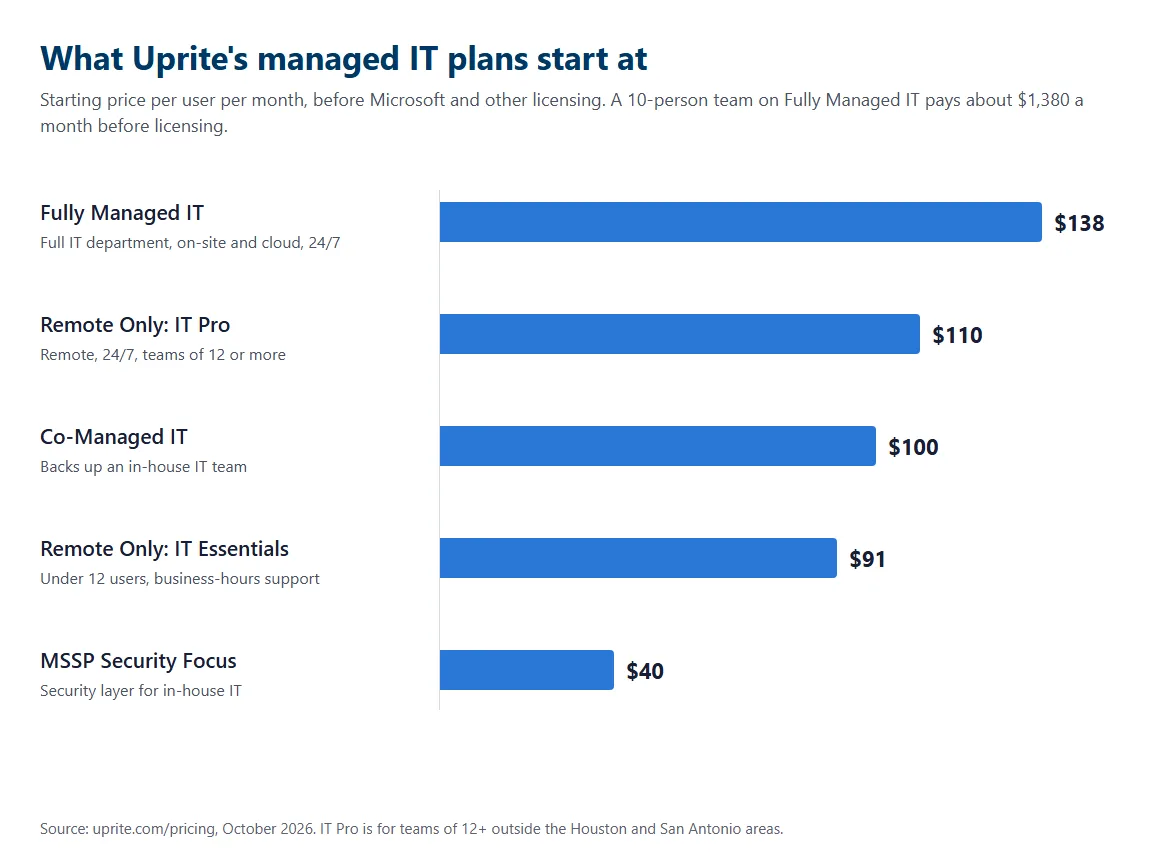
At Uprite, plans start at $138 per user per month for fully managed IT, $100 for co-managed, and $40 for a security-only layer, with remote-only plans at $91 and $110. Licensing comes on top. Across Texas, fully managed IT commonly runs $125 to $225 per user.
So a 10-person team on Fully Managed IT pays about $1,380 a month before licensing. The chart shows every plan. That Texas range comes from our own Texas MSP Pricing Index, which tracks what providers across the state charge, metro by metro.
| Uprite plan | Starts at, per user per month | Support hours | Built for |
|---|---|---|---|
| Fully Managed IT | $138 | 24/7, with on-site support | Companies replacing an entire IT department |
| IT Pro, remote only | $110 | 24/7 | Teams of 12 or more outside the Houston and San Antonio areas |
| Co-Managed IT | $100 | 24/7 | Companies with in-house IT that need backup and strategy |
| IT Essentials, remote only | $91 | Business hours, 8 hours per user per month | Teams under 12 on Microsoft-native tools |
| MSSP Security Focus | $40 | 24/7 security monitoring | In-house IT teams adding firewall, SIEM, and SOC coverage |
Why do providers charge per user instead of per device?
People create the support work, not devices. One employee might use a laptop, a phone, and 3 cloud apps, and per-user pricing covers all of it at one rate. Budgeting gets simple too. New hire, new seat. The bill moves by a known amount.
Per-device pricing still fits shared machines, like shop-floor terminals or a front-desk computer that 5 people use over a shift. Compare carefully. The pricing page explains how our per-user billing works and how to compare it against a per-device quote.
Is managed IT cheaper than hiring an in-house IT person?
For most companies under 50 people, yes. One hire costs a salary plus benefits, tools, and training, and still leaves nights, vacations, and sick days uncovered. A provider brings a whole team. Above about 150 users, a mix of both often wins.
Salary is only part of it. The Bureau of Labor Statistics puts the median pay for computer user support specialists at $61,860 as of May 2025, and that buys a single help desk person with no backup when they’re out sick, on vacation, or gone for good. Then add the rest. The in-house IT vs MSP cost comparison adds benefits, tools, training, and recruiting.
What does an hour of downtime actually cost a small business?
It depends on your size, and most quoted figures won’t fit yours. Add lost gross profit and idle payroll per hour down, then recovery labor and lost customers. For a 10 to 50 person company, our math usually lands between $1,500 and $8,000 an hour. Smaller firms, less.
Be wary of the famous $5,600-per-minute figure. It’s a 2014 Gartner figure. Run your own numbers instead. Our guide to the cost of IT downtime has the full formula, a worked example for a 40-person distributor, and a table of hourly ranges by company size that you can check your own numbers against.
Is managed IT worth it for a company with fewer than 10 employees?
Often, but not always. A 3-person office on cloud apps with no compliance duties may do fine with occasional help. Once you handle customer data, carry cyber insurance, or lose real money when email goes down, a small plan usually pays for itself.
IT Essentials was built for this case, teams under 12 on Microsoft-native tools, starting at $91 per user on the Uprite pricing page. Honestly? Under 5 users, a managed agreement often doesn’t pencil out. We’ll tell you.
What should a managed IT contract and SLA include?
How long is a typical managed IT contract?
Many run 12 months and renew automatically for another 12 unless you give notice in time. At Uprite, many clients choose an annual agreement. It continues month to month after the initial term, and our 120-day promise lets you leave if you’re not satisfied. No 3-year term required.
Term length matters less than exit terms. Read the notice period. Read the renewal date. Then read exactly what happens to your data, passwords, and documentation on the way out, because that clause decides how painful leaving will be if the relationship ever goes wrong. The MSP contract guide for Texas buyers covers each clause.
Can I get out of a managed IT contract if the service is bad?
Only if the contract allows it, which is why you check before signing. Look for a termination-for-cause clause, a notice period you can live with, and written terms for returning your data, passwords, and documentation. Our 120-day promise lets unhappy clients walk away without a fight. Get it in writing.
Before giving notice to any provider, make sure an account your company controls holds the Global Administrator role in Microsoft 365. That one step prevents most messy exits. A guide to switching MSPs without downtime lists the remaining steps in order.
What response time should a managed IT SLA promise?
Expect a typical ticket to reach a human within minutes, and a written target for critical incidents, commonly 15 minutes. Our help desk averages about 5 minutes to first response, against a triage SLA under 10 minutes. Ask to see that in a report.
A target alone proves little. Ask for the hit rate. Ask when the clock runs. Our MSP SLA benchmarks for 2026 compare the published industry datasets side by side and explain which numbers belong in your contract, which belong in a monthly report, and which only look good on a sales slide.
What’s the difference between response time and resolution time?
Response time is how fast someone starts on your ticket. Resolution time is how long the fix takes. A provider can hit a 15-minute response target and still leave you down all day. So ask for both. Then ask for monthly reports against each.
Watch for undefined terms. If an SLA says first response without defining it, an automated email reply might count, and a provider could report a perfect month while your staff waited hours for a person. Insist on a definition, and compare the targets against our response and resolution benchmarks.
Can the monthly rate go up during the contract?
It can, if the contract allows an annual escalator, so look for one in the term clause. Uprite guarantees your rate won’t increase during your first year. After that, any change should come with written notice. Never as an invoice surprise.
Escalators hide in renewal language. Our Texas managed IT pricing breakdown lists the 7 billing traps worth checking before you sign, including the jump that shows up in year 2 after an introductory rate quietly expires and nobody on your side notices.

Which managed IT model fits your business?
What is co-managed IT?
Co-managed IT pairs an outside provider with the IT staff you already have. Your people keep what they know best, and the provider adds coverage, tools, security, and strategy. In Texas it typically runs $60 to $130 per user per month. Uprite’s starts at $100.
Ownership decides it. Ask for a responsibility matrix with exactly one owner for every task, from patching and backups to vendor calls and staff training, because a task with 2 owners usually ends up with none. The managed IT vs co-managed IT comparison shows where each model fits.
Do I still need an IT person on staff if I hire an MSP?
Under about 100 employees, usually not. You do need one internal decision maker who owns priorities and approves spending, though that can be an operations manager. Larger or heavily regulated companies often keep an internal lead. The provider adds depth.
That person needs authority, not technical skills. It’s a management job. Read the true cost of in-house IT vs an outsourced MSP to see when a dedicated internal hire starts to earn its keep, and when the same money buys more coverage from a team.
What is a vCIO, and do I need one?
A vCIO, or virtual chief information officer, plans your technology instead of fixing it. That means the roadmap, the budget, the hardware lifecycle, and security priorities. No plan past this quarter? Then you need one. Uprite includes it in Fully Managed IT.
A vCIO isn’t a CTO. Mixing them up gets expensive. The vCIO vs CTO comparison explains which role a growing company actually needs, using May 2025 BLS pay data to show what each one costs if you hire it full time instead of sharing it through a provider.
Do I need on-site support, or is remote support enough?
Most tickets get solved remotely, often within minutes. On-site support matters when you run servers, network gear, printers, or phones in your own building, or when staff can’t fix hardware alone. Uprite’s Fully Managed IT includes on-site work. Remote plans can add it.
Distance matters. For teams of 12 or more outside the Houston and San Antonio areas, IT Pro gives 24/7 remote coverage at $110 per user, as listed on the Uprite plans and pricing page.
How long does onboarding with a new managed IT provider take?
For a single-site company of 30 to 60 people, onboarding usually runs 4 to 6 weeks. That covers discovery, documentation, tool deployment, urgent fixes, and handover. Multi-site businesses take longer. So do undocumented ones. Be skeptical of anyone promising full onboarding inside a week.
Daily support usually goes live much sooner. The deeper work continues behind it. Each stage, with typical timing, is laid out in what an MSP does during onboarding and after, from the first discovery interviews to the handover meeting where you should receive documentation you can keep whether you stay or not.
What about security, compliance, and switching providers?
Does managed IT include cybersecurity?
It should cover the basics, such as endpoint protection, patching, email filtering, MFA, and backups. Deeper layers like a 24/7 security operations center, SIEM, or compliance work are often a separate tier. Ask who watches the alerts. A tool nobody watches isn’t security.
It’s not a small question. Verizon’s 2026 Data Breach Investigations Report found ransomware in 48% of breaches, and IBM puts the 2026 global average breach cost at $4.99 million. That average spans companies of every size, and even a small fraction of it would hurt most small businesses badly. For teams that already have IT, managed security services add that monitored layer.
Will a managed IT provider help with my cyber insurance application?
A good managed IT provider will help, because applications ask technical questions most owners can’t answer alone. Insurers want proof of MFA on email and admin accounts, tested offline or cloud backups, and written policies. And claiming a control you don’t have can cost you the payout after a breach.
Close gaps before applying. Not after. The guide to navigating the cyber insurance application covers the questions carriers ask most, from multi-factor authentication to offline backups and a tested continuity plan.
Does Texas law require my business to protect customer data?
Yes, Texas law requires it. Business and Commerce Code section 521.052 requires a business to maintain reasonable procedures that protect sensitive personal information, though it names no specific framework. Firms that count as financial institutions under federal GLBA rules, such as tax preparers and mortgage brokers, are carved out and answer to federal rules instead.
The statute text is short. Read it. For financial firms, the Safeguards Rule at 16 CFR 314.4(f) goes further and requires you to oversee your service providers by contract and to assess them periodically, based on the risk they present and whether their safeguards still hold up. Separately, Texas SB 2610 shields businesses under 250 employees from exemplary damages after a breach if they ran a qualifying security program built on a recognized framework, which our contract guide breaks down by company size.
How do I switch MSPs without downtime?
Take control of your own admin credentials before you give notice. Then move one system at a time during an overlap, typically 30 days, while both providers have access. Full handover usually takes 30 to 90 days. Daily support starts sooner.
Moving everything in one weekend is the classic mistake. Trusting untested backups is another. The step-by-step guide on how to switch MSPs without downtime covers DNS, email cutover, the contract checks, and the rollback point you should demand for each system before a single one moves.
What should I ask a managed IT provider before signing?
Ask for things you can verify, not promises. Request the SLA with real numbers, the full exclusions list, how incidents get reported to you, which work is subcontracted, how your data comes back if you leave, and a real sample of ticket history. Vague answers are an answer.
CISA’s guidance includes a solid pre-signing checklist. Here’s a small-business version.
- Service level agreements with specific targets, kept separate for IT support and security services
- Detailed incident management terms, including who responds and what you’re owed for outages
- A transition plan, with any downtime scheduled at a time you choose
- Notice of any subcontractors who could touch your data
- Records of who accessed your systems, when, and what they did
- Proof of the provider’s financial health and its record with other clients
CISA adds one more for owners. Keep your own offsite backups and logs, separate from the provider’s. The Texas MSP contract guide shows where each item belongs in the paperwork, and the NIST small business cybersecurity resources are a free, plain-spoken place to start if you want your own baseline before talking to anyone.
Still have a question we didn’t answer?
Ask us. We’ve supported Texas businesses since 1999, today with a team of 42, and we’d rather answer a hard question in a first meeting than in month 6. Every plan carries a 120-day satisfaction promise and a first-year rate lock. Not the right fit? We’ll say so.
You can see what each plan includes on our page for managed IT services in Texas, or book a free IT assessment and walk away with a written scope you can keep and hand to any provider, whether or not you ever hire us.
Want straight answers for your own office? Our team will review your current setup, your contract, and your costs, then tell you plainly what’s worth changing and what isn’t.
Speak to an IT Expert