For onsite vs remote IT support in San Antonio, the rule is simple. Anything that still powers on and can reach the internet gets fixed remotely. A technician has to come out when hardware or cabling must physically change, or when a defense or HIPAA rule changes how the visit has to happen. Our guide to IT support in San Antonio lists the plans, and Fully Managed IT is the one with onsite work included.
In San Antonio, remote IT support handles anything that still powers on and reaches the internet, and a technician comes onsite when hardware or cabling must physically change or a compliance rule needs a person in the room. Remote goes first. The exceptions cost money.
Does somebody need to drive out, or can this be fixed from a desk? Every San Antonio ticket hits that fork first. Guess wrong one way and a receptionist waits half a day for a truck that’s coming to reset a password. Guess wrong the other way and a remote session burns the whole morning on a switch that died before anyone got to work. Both hurt.
So comparing onsite vs remote IT support in San Antonio isn’t really a choice between 2 kinds of company. You want both. One queue. What you need is the sorting rule, plus the local details that bend it, like defense subcontract rules around Joint Base San Antonio, clinic paperwork in the South Texas Medical Center, and visits out to Schertz, New Braunfels, and Boerne.
I run operations at Uprite, so when dispatch goes wrong, it lands on my desk. My bias is simple. Plan remotely, then drive. The technician walks in with the right part and walks out with the ticket closed.
What can a remote technician actually fix in a San Antonio office?
Remote IT support is help delivered over the internet to a device that’s switched on and connected. A technician uses management tools such as Microsoft Intune, or a screen-sharing session the user approves, to change settings, push software, reset accounts, and pull diagnostics without anyone traveling to the building.
Microsoft’s list of Intune device actions doubles as a map of that toolbox. From the cloud, an admin can restart a Windows PC, wipe a lost laptop, collect diagnostic logs, rotate a BitLocker recovery key, reinstall Windows with Fresh Start, run a Defender scan, or open a remote assistance session. No car required.
There’s a catch. Microsoft’s prerequisites say a device has to be enrolled in Intune and connected to the internet to receive the command. No connection, no fix.

Some jobs sound like a visit and usually aren’t.
- A laptop stuck on the BitLocker recovery screen. It wants a 48-digit recovery password, and when that key was saved to Microsoft Entra ID, Microsoft’s BitLocker guidance says access to it can be delegated to the help desk. One phone call.
- New hire, Monday start, working from home in Helotes? With Windows Autopilot, the user connects to a network and signs in, and Microsoft says everything after that is automated, so the laptop can ship straight to the house and finish setting itself up there.
- Lost at the airport. Find it on a map. Then wipe it.
- A reception PC that froze gets a remote restart before anybody reaches for car keys.
One exception deserves a mention. Microsoft’s Intune page notes that Intel vPro machines managed through Intel vPro Fleet Services can be reached out of band, even when Windows is unresponsive or the PC is powered off. If your laptops carry vPro and nobody ever set that up, you own a capability that’s sitting in a drawer. Worth a look.
Which San Antonio IT problems actually need a technician in the room?
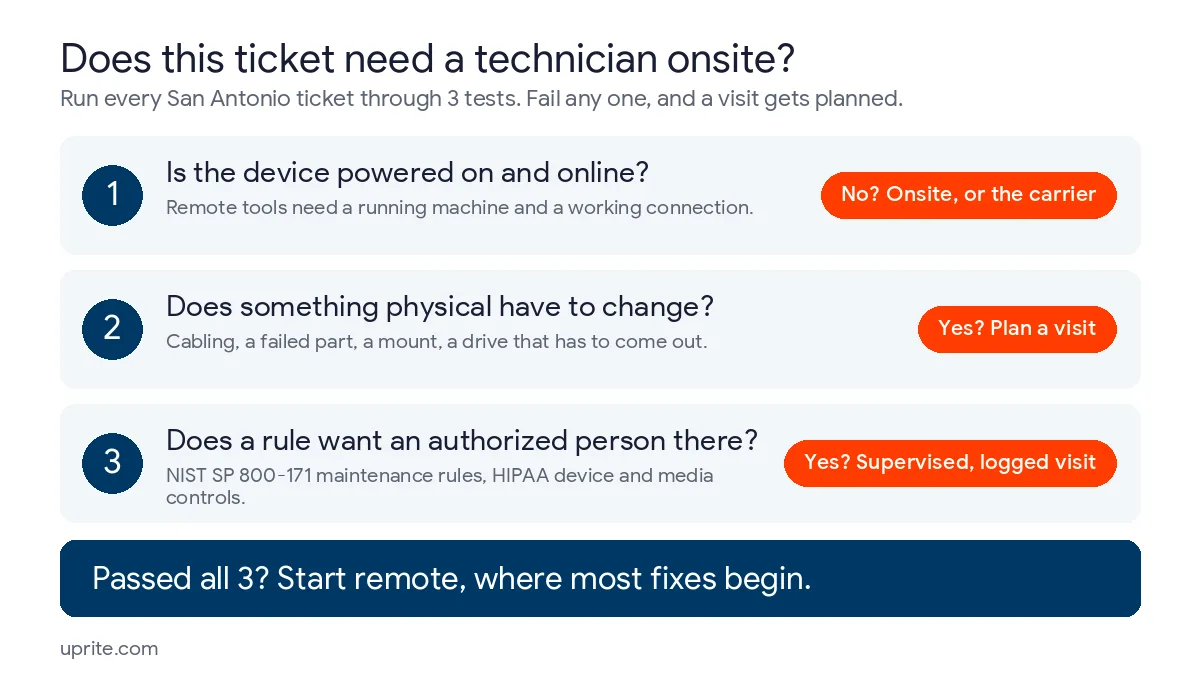
A problem needs a technician when it fails any of 3 tests. The device can’t power on or reach the internet, something physical has to change, or a rule wants an authorized person present. Pass all 3? Start remote.
Reach comes first. Remote tools talk to a running machine over a working connection, so a dead switch, a cut cable, or a laptop with a failed board takes the remote option off the table before anyone opens a session. Hands come second. Mounting an access point, re-terminating a cable, replacing a power supply, or pulling a drive is physical work, however clever the software gets. Software has no hands.
The third test is local. Defense contracting and health care both run on rules about who may touch equipment, who has to watch, and what gets written down when hardware moves, and San Antonio has plenty of both. Those rules don’t care how quick a remote session would have been. Not one bit.
Run a week of typical San Antonio tickets through the 3 tests and they sort like this.
| Ticket | Powered and online? | Something physical changes? | A rule wants a person there? | Where it gets fixed |
|---|---|---|---|---|
| Laptop asks for its BitLocker recovery key | Powered, and the key lives in the cloud | No | No | Remote, by phone, if the key was saved to Entra ID |
| New hire starts Monday, working from home in Helotes | Yes | Only if docks and monitors are involved | No | Remote, with the laptop shipped |
| Front-desk check-in PC dies at a Medical Center clinic | No | Yes | Yes, HIPAA device and media controls | Onsite, with the swap and the old drive recorded |
| Server holding CUI needs maintenance at a defense subcontractor | Yes | Sometimes | Yes, NIST SP 800-171 maintenance rules | Remote with MFA, or onsite, supervised if the technician lacks access authorization |
| Switch fails in a Schertz warehouse office | No | Yes | No | Onsite, faster if a configured spare is on the shelf |
| Office internet goes down in Boerne | No | Maybe | No | Phone triage first, then the carrier or a technician |
| Ballroom Wi-Fi drops before a River Walk event | Partly | Maybe | No | Remote first, then a visit if an access point or cable failed |
| Laptop won’t boot past the manufacturer logo | No | Maybe | No | Onsite, unless it’s a vPro machine set up for out-of-band management |
Look at the Boerne row. A dead connection fails the first test, yet the technician who fixes it might not work for your IT provider at all. When the fault sits on the carrier’s side of the line, the carrier sends its own crew. Different truck entirely. What remote support can do is prove which side failed, from the monitoring history and from a staff member reading the lights on the modem, so nobody books the wrong truck.
Why does San Antonio’s industry mix change the onsite answer?
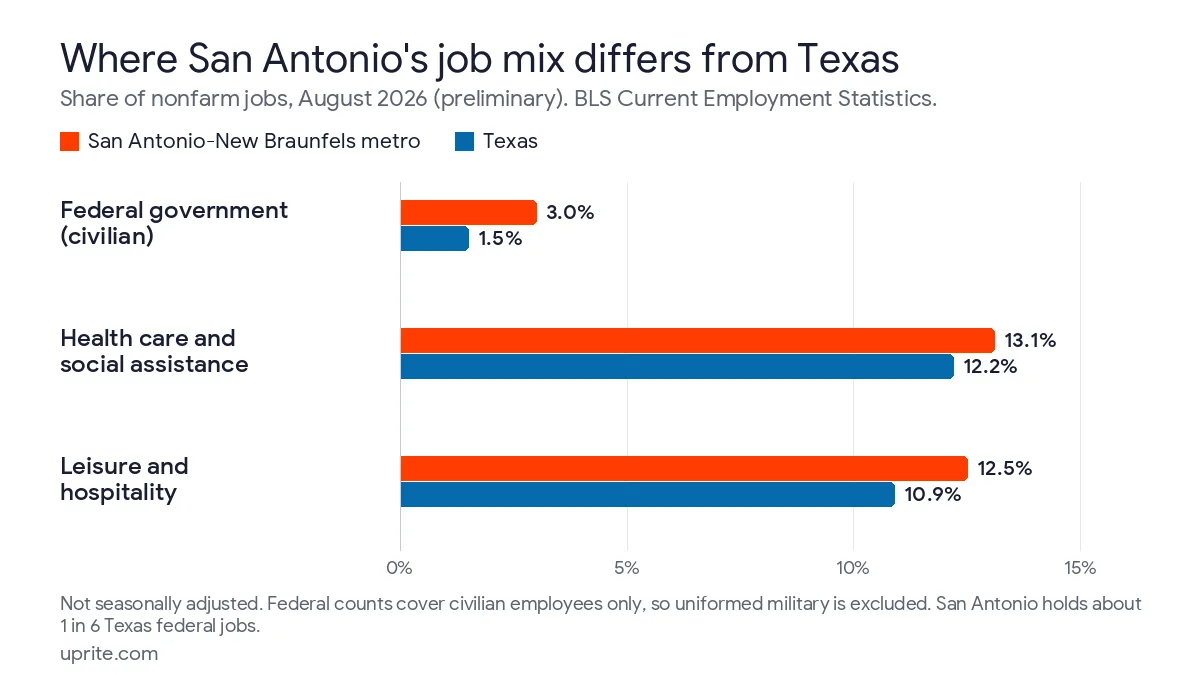
San Antonio leans harder than Texas on federal work, health care, and hospitality. 2 of those 3 come with written rules about who may touch equipment and what has to be recorded when hardware moves.
The Bureau of Labor Statistics counted 36,100 federal government jobs in the San Antonio-New Braunfels metro in August 2026, a preliminary figure. That’s 3.0% of the metro’s 1,191,700 nonfarm jobs, about double the 1.5% share statewide, and roughly 1 in every 6 federal jobs in Texas. It still undercounts the footprint. BLS payroll counts cover civilian employees only, so nobody in uniform at Joint Base San Antonio shows up in that number.
| Industry, August 2026 (preliminary) | San Antonio-New Braunfels jobs | Share of metro jobs | Share of Texas jobs |
|---|---|---|---|
| Federal government (civilian) | 36,100 | 3.0% | 1.5% |
| Government, all levels | 181,800 | 15.3% | 14.3% |
| Health care and social assistance | 156,000 | 13.1% | 12.2% |
| Leisure and hospitality | 149,500 | 12.5% | 10.9% |
Figures are BLS Current Employment Statistics estimates for August 2026, not seasonally adjusted and still preliminary.
Health care and social assistance accounts for 156,000 jobs in the metro, and leisure and hospitality adds 149,500 more. Together, more than 1 in 4 jobs. Each breaks differently.
Defense subcontractors near Joint Base San Antonio
If a defense subcontract puts controlled unclassified information on your network, your maintenance rules come from NIST SP 800-171 Revision 2, the version the Defense Department’s CMMC rule uses for Level 2 under 32 CFR 170.14. 3 of its maintenance requirements read as if they were written about this exact question.
- Requirement 3.7.5 allows remote maintenance, but it requires multifactor authentication to open the session over an external connection and requires that connection to end when the work is done.
- 3.7.6 says maintenance personnel without the required access authorization have to be supervised, and 3.10.3 adds escorting visitors and monitoring what they do.
- Taking a laptop back to the shop? Requirement 3.7.3 wants equipment removed for off-site maintenance sanitized of any CUI first.
Nobody banned remote. The rules just fence it in. Routine work fits a remote session that demands MFA and closes when the job’s finished. Physical work becomes a scheduled visit, escorted whenever the technician lacks access authorization. Our page on CMMC compliance in San Antonio covers the rest of the program. Plan for both.
Clinics in the South Texas Medical Center and beyond
To a clinic manager, a dead check-in PC looks like a quick swap. HIPAA sees a hardware movement. The Security Rule’s device and media controls at 45 CFR 164.310(d) call for policies on hardware and media that carry patient data into, out of, and around a facility, plus procedures for disposal and for clearing data before media get reused. A record of each movement, and of the person responsible, is listed too.
Carrying is physical. Somebody walks the old machine out, logs it, and makes sure the drive gets wiped or destroyed under your disposal policy. Clinic hardware work belongs on a planned visit with a paper trail. Our approach to HIPAA cybersecurity in San Antonio covers the rest of the Security Rule.
Hotels, restaurants, and River Walk venues
Hospitality’s constraint is the calendar. Card terminals, kitchen printers, front-desk PCs, and the access points above a ballroom are all physical, and they earn their money in exactly the hours a technician would like to work on them.
Dead hours get the remote work. Visits get scheduled around service. A provider that never asks for your event calendar will eventually reboot something halfway through a banquet. Hand it over early.
How does onsite dispatch work for New Braunfels, Schertz, and Boerne?
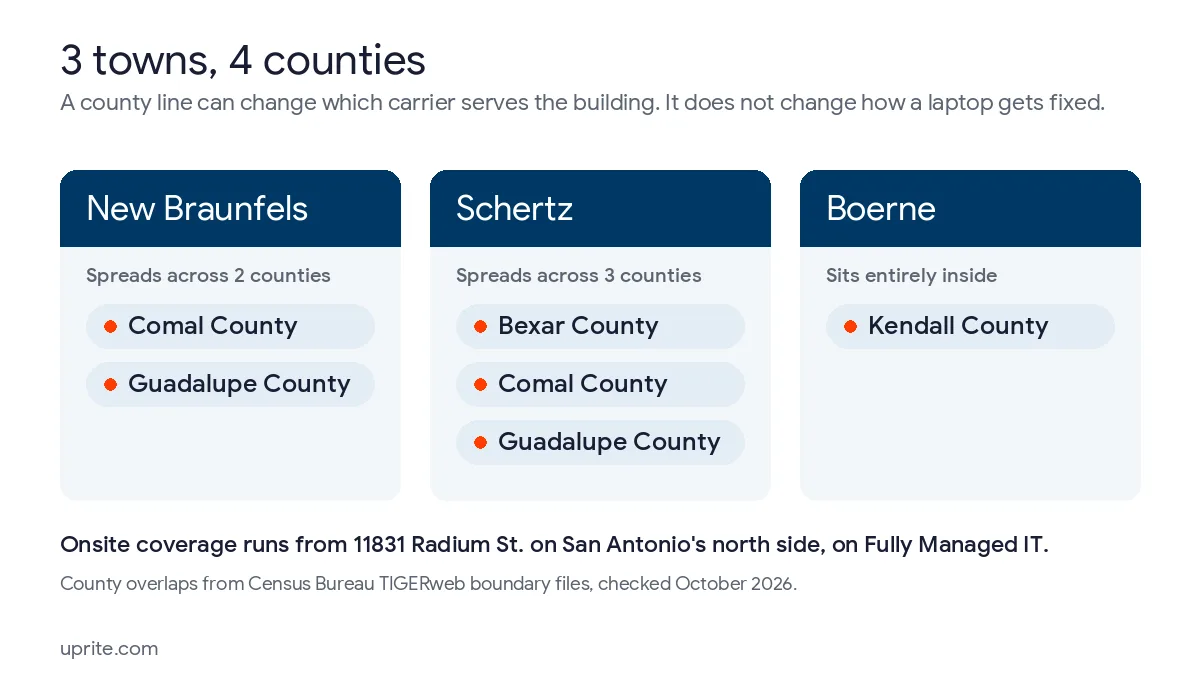
Uprite’s technicians work out of 11831 Radium St. on San Antonio’s north side, and the published onsite coverage includes New Braunfels, Schertz, Cibolo, Selma, and Boerne. Onsite work comes with Fully Managed IT. The other plans are remote-first and can be upgraded to include onsite service.
Radium Street is the San Antonio office, and the company also runs offices in Houston and Dallas. Uprite is a Texas managed IT and cybersecurity provider with a team of 42 and Texas clients going back to 1999. Outside the towns named here? Ask before you assume, through our contact page.
3 towns, 4 counties. Census Bureau TIGERweb boundary files put Schertz across Bexar, Comal, and Guadalupe counties, New Braunfels across Comal and Guadalupe, and Boerne entirely inside Kendall County.
A county line won’t change how a laptop gets fixed. It can change which carrier serves your building and how long a new circuit takes, which matters the day the internet drops and the real question is whose truck to call. Our pages on managed IT in New Braunfels, IT for Schertz companies, and Boerne and Kendall County go town by town.
Distance leaves the sorting alone. Wasted trips cost more. An office in Boerne needs the same 3 tests as one on Broadway, but a visit that shows up without the right spare part eats a much bigger slice of everyone’s day out there. Ask any provider what it prepares before a technician leaves for a suburb. A configured replacement and a named contact at the building turn one trip into a closed ticket.
Uprite doesn’t publish an arrival time, and I’d be careful with anyone who quotes one before seeing your address. We publish answering times. Our average first response runs about 5 minutes across every priority level, measured on our own tickets, which is an average and not a per-ticket promise, and every ticket is triaged inside 10 minutes. Neither clock measures a drive. Our breakdown of IT support response time in San Antonio explains why buyers mix them up, and the after-hours coverage guide covers what a night or weekend clause should name.
Which plan puts a technician at your door, and who can skip one?
Fully Managed IT is the plan with onsite and cloud infrastructure management, starting at $138 per user per month on our published pricing. IT Essentials, at $91, is remote only and built for teams under 12, with business-hours support capped at 8 hours per user a month. IT Pro, at $110, is remote only as well, and it’s built for teams of 12 or more outside the Houston and San Antonio areas.
Picture a 20-person San Antonio office. It usually compares Fully Managed IT with Co-Managed IT, which starts at $100 and suits a company keeping its own IT person. The remote plans can be upgraded with onsite service, but the price of that upgrade isn’t on the pricing page, so get it in writing. For everything each plan covers, start with managed IT services in San Antonio.
Where do offices land?
- 8 people in Stone Oak on laptops and Microsoft 365, no server, no network gear worth naming. Remote-only IT Essentials can carry that, as long as business-hours help is enough.
- A 30-person distributor in Schertz whose switch and Wi-Fi run the loading dock needs Fully Managed IT, because the network is the business. What that work involves is laid out in our guide to computer network support in San Antonio.
- Clinic near the Medical Center, 15 staff? Onsite included, since every hardware swap means a logged visit.
- Defense subcontractor, 20 people, CUI on the file server. Onsite included, plus a remote tool that enforces MFA and ends each session when the work is done.
Read the first bullet twice. We sell managed IT, and we’d still tell that Stone Oak office not to pay for visits it won’t use. Our older piece on onsite IT support makes the case for local hands, and it’s right for offices that own physical gear. Plenty don’t.
When does remote support become the risk instead of the fix?
Remote support becomes a risk when someone other than your provider starts the session. CISA and Microsoft have both documented attackers posing as IT support to get staff to install or approve remote access tools.
In a January 2023 joint advisory, CISA, the NSA, and MS-ISAC described help desk-themed phishing that got federal employees to download portable copies of 2 legitimate remote tools, ScreenConnect and AnyDesk, in a campaign CISA first identified in October 2022. No admin rights needed. That let them slip past controls built to stop software installs.
Microsoft saw it too. A May 2024 Microsoft Threat Intelligence report described a group Microsoft tracks as Storm-1811 phoning targets while impersonating IT or help desk staff, talking them into a Quick Assist session, and in several cases finishing with Black Basta ransomware. By the end of that month the same group was messaging people on Microsoft Teams under names like Help Desk and IT Support.
Safe remote work runs on boring rules that never bend. Boring is good. Microsoft’s Quick Assist documentation tells users to allow a helper only when they started the contact with their own IT support staff. On our side, the published rule is that technicians verify the caller before any password or MFA change and record how they confirmed it. Teach 3 habits.
- Never accept a remote session you didn’t ask for. Hang up and call the number you already have. Ours is (210) 390-3700.
- A Teams chat from an account named Help Desk is unverified until your actual help desk confirms it.
- Ask your provider which remote tool it uses, then block the others, which is the application allowlisting CISA recommends. Microsoft goes further and suggests removing Quick Assist if you’ve standardized on a tool like Remote Help.
Questions San Antonio Offices Ask Before They Pick Onsite or Remote
Does Uprite send technicians to New Braunfels, Schertz, and Boerne?
Yes, on Fully Managed IT. Uprite’s published onsite coverage includes New Braunfels, Schertz, Cibolo, Selma, and Boerne, with technicians working from 11831 Radium St. on San Antonio’s north side. The remote-first plans can add onsite service as an upgrade.
How quickly can a technician get to my office?
Nobody should promise that before seeing your address. Uprite publishes answering times instead, a first response that averages about 5 minutes and triage inside 10 minutes on every ticket.
Can a laptop that won’t turn on be fixed remotely?
Usually not. Remote tools need a powered device with a working connection, and Microsoft lists internet access as a prerequisite for Intune remote commands. The exception is an Intel vPro machine set up for out-of-band management through Intel vPro Fleet Services, which can be reached even when Windows won’t respond or the PC is off.
Is remote maintenance allowed if we handle CUI on a defense subcontract?
It is, with conditions. NIST SP 800-171 requirement 3.7.5 calls for multifactor authentication to start a nonlocal maintenance session over an external connection and for that connection to end when the work is complete. Visits carry rules too. Requirement 3.7.6 says maintenance staff without the required access authorization have to be supervised, so plan who escorts the technician.
Does a clinic need a technician for every workstation swap?
For the swap itself, yes, because hardware has to move. Under 45 CFR 164.310(d), HIPAA expects policies for hardware and media carrying patient data into, out of, and around your facility, and the old drive has to be cleared or destroyed under your disposal policy.
What should staff do if someone calls offering remote help?
Hang up and call the help desk number you already have. Microsoft’s Quick Assist guidance says to allow a helper only when you started the contact with your IT support staff directly. Uprite’s San Antonio support line is (210) 390-3700.
Do we still need onsite support if we’re fully on Microsoft 365?
Less than you’d think, and more than zero. Cloud email and files remove the server, but somebody still owns the firewall, the switch, the Wi-Fi, and the printers. An office under 12 people with no network gear of its own can often live on remote-only IT Essentials at $91 per user.
Want a second opinion? Send us your office addresses and last month’s tickets, and a San Antonio specialist will talk through which ones needed a technician and which plan fits.
Speak to a San Antonio IT Expert