
IT Problems Aren’t Just Annoying. They’re Expensive
Most Houston small businesses don’t think IT is a problem until something breaks.
Then everything stops.
Employees can’t work. Customers can’t reach you. Revenue slows down. And what looked like a small issue turns into a real business problem fast.
Here’s what I see all the time. Companies don’t lose ground because of one big failure. They lose ground because of repeated, preventable IT problems that never get fully fixed.
If that sounds familiar, you’re not alone. But it does mean you’re operating with more risk than you should be.
Let’s walk through the most common IT problems Houston small businesses face and what it actually takes to fix them.
The 10 Most Common IT Problems Houston Small Businesses Face
1. Slow Networks and Poor Performance
This is usually the first complaint.
- Systems take too long to load
- Files lag
- Applications freeze during normal work
It doesn’t feel like a big issue at first. But it adds up across your entire team.
What’s really happening
- Outdated hardware
- Poor network setup
- No performance monitoring
What it costs you
- Lost hours every week
- Frustrated employees
- Slower customer response times
How to fix it
- Upgrade aging infrastructure
- Clean up and optimize your network
- Put monitoring in place so you catch issues early
2. Frequent Downtime That Disrupts Operations
Downtime is where things get expensive.
Even a short outage can ripple through your entire operation.
What causes it
- Server failures
- Network outages
- No proactive maintenance
What it costs you
- Revenue loss
- Missed deadlines
- Damage to your reputation
How to fix it
- Monitor systems 24/7
- Maintain infrastructure regularly
- Build in redundancy so one failure doesn’t take everything down
3. Cybersecurity Threats and Ransomware
A lot of small businesses still think they’re too small to be targeted.
That’s not how it works anymore.
You’re a target because you’re easier to breach.
What we see most
- Phishing emails
- Weak passwords
- Ransomware attacks
What it costs you
- Data loss
- Financial damage
- Potential legal exposure
How to fix it
- Use endpoint protection across all devices
- Train your team to spot threats
- Turn on multi-factor authentication everywhere
4. Data Loss and Failed Backups
Backups give people a false sense of security.
Until they try to restore something and realize it doesn’t work.
What goes wrong
- Backups aren’t running consistently
- No one tests them
- Recovery plans don’t exist
What it costs you
- Permanent data loss
- Business disruption
- Compliance problems
How to fix it
- Automate backups
- Test them regularly
- Build a real disaster recovery plan
5. Outdated Hardware and Software
Old systems don’t just slow you down. They expose you.
Unsupported software doesn’t get security updates. That’s where problems start.
What’s happening
- Servers past their lifecycle
- Old operating systems
- Unsupported applications
What it costs you
- Security vulnerabilities
- System instability
- Compatibility issues
How to fix it
- Replace aging hardware on a schedule
- Keep software updated
- Plan upgrades instead of reacting to failures
6. Poor Remote Work and Cloud Setup
Remote work is standard now. But a lot of businesses never set it up properly.
They patched something together and moved on.
What that leads to
- Slow connections
- Access issues
- Security gaps
What it costs you
- Lower productivity
- Increased risk
- Frustration across the team
How to fix it
- Standardize your cloud environment
- Secure remote access properly
- Make sure your systems are built for how your team actually works
7. Slow or Unresponsive IT Support
This one creates a lot of hidden costs.
If it takes too long to fix issues, your business slows down, whether you realize it or not.
What we see
- Long response times
- No clear accountability
- Tickets sitting unresolved
What it costs you
- Extended downtime
- Lost productivity
- Ongoing frustration
How to fix it
- Set clear response expectations
- Use a structured help desk system
- Work with a provider that responds when it matters
8. Compliance and Regulatory Risks
A lot of businesses don’t think about compliance until they have to.
By then, it’s usually urgent.
If you handle sensitive data, you’re already expected to meet certain standards.
Where gaps show up
- Missing policies
- Weak security controls
- No documentation
What it costs you
- Fines
- Legal risk
- Reputation damage
How to fix it
- Run regular compliance checks
- Align with accepted frameworks
- Document your processes properly
9. Email and Communication Failures
Email is still the backbone of most businesses.
When it goes down, everything slows down.
Common issues
- Spam overload
- Delivery failures
- System outages
What it costs you
- Missed opportunities
- Internal delays
- Frustrated customers
How to fix it
- Use secure, reliable email platforms
- Filter spam effectively
- Monitor system health consistently
10. No IT Strategy or Long-Term Planning
This is the root of most problems.
If you don’t have a plan, you’re always reacting.
That’s where costs stack up.
What this looks like
- Fixing the same issues repeatedly
- No clear direction for IT investments
- Decisions made under pressure
What it costs you
- Unpredictable spending
- Ongoing inefficiencies
- Slower business growth
How to fix it
- Build a clear IT roadmap
- Align IT with your business goals
- Make decisions proactively, not reactively
What These IT Problems Are Really Costing You
Most of these issues don’t show up as a single line item.
They show up in lost time, missed opportunities, and unnecessary risk.
- Downtime can cost $5k to $9k per hour
- Cyber incidents can run into $200k or more
- Productivity losses can hit 20 to 30 percent
That’s not theoretical. That’s what we see in real businesses.
Quick IT Health Check
If you’re not sure where you stand, start here.
- Systems slow down regularly
- Downtime happens more than once a quarter
- Backups aren’t tested
- Security tools are basic or outdated
- Employees complain about IT issues
- There’s no clear IT strategy
If you checked a few, there’s risk.
If you checked most, it’s already costing you money.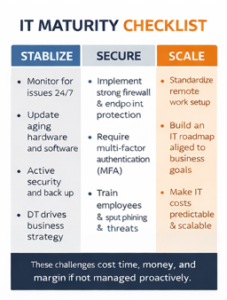
When It’s Time to Bring in Outside IT Support
There’s a point where internal fixes stop working.
That usually shows up as patterns.
- Problems repeat
- Downtime increases
- Security risks grow
- Your team spends more time fixing issues than doing their jobs
At that point, it’s not about fixing one issue. It’s about changing how IT is managed.
How Managed IT Services Actually Fix This
The shift is simple.
You move from reacting to problems to preventing them.
That changes everything.
- Systems are monitored around the clock
- Issues are fixed before they turn into downtime
- Security is built in, not added later
- Support is consistent and accountable
- IT decisions are planned, not rushed
The outcome is what most businesses are really after.
- Less downtime
- More predictable costs
- Better overall performance
FAQ
1. Most often, which IT difficulties do Houston small enterprises run against?
Houston small companies frequently struggle with sluggish networks, downtime, cybersecurity threats, failed backups, antiquated systems, and inadequate remote configurations. Over time, these problems accumulate and lower output, raise risk, and generate hidden costs impacting everyday operations and long-term growth.
2. For small businesses, IT issues turning pricey?
IT issues seldom stay small. A short outage or sluggish system can swiftly result in missed deadlines, lost income, and dissatisfied consumers. Costs also comprise employee downtime, recovery costs, and probable data loss, therefore making even little problems financially important over time.
3. How could poor network performance affect productivity?
Delays in loading files, running programs, and finishing daily chores are brought on by slow networks. These little delays add up over time across teams, costing lost hours, decreased productivity, and exasperation that finally affects client experience and general corporate performance.
4. What results in regular downtime in small business IT networks?
Downtime usually results from obsolete servers, inadequate network infrastructure, or a failure to undertake proactive upkeep. A single failure can halt the whole firm and cause financial losses and operating delays if not monitored and redundant.
5. Small companies are affected by cybersecurity threats as follows?
Data breaches, financial loss, and legal concerns can result from cybersecurity threats, including phishing, ransomware, and weak passwords. Because they lack robust defenses, small businesses are frequently sought after; hence, security is a crucial component of avoiding significant disturbances.
Takeaway
Most Houston small businesses aren’t dealing with just one IT problem.
They’re dealing with the same issues happening over and over again.
That’s where the real cost shows up.
- Lost productivity every week
- Recurring downtime
- Growing security risk
- Unpredictable IT spending
Fixing issues one at a time doesn’t solve this. It keeps you stuck.
What actually works is a different approach:
- Proactive support instead of reactive fixes
- A clear IT roadmap instead of guesswork
- Systems built to support growth
Schedule a free IT assessment with Uprite and get a clear view of your risks, what’s causing them, and how to fix them before they cost you downtime or revenue.