Managed IT Services in Arlington for Plant Floors, Clinics, and Game Days
Uprite provides managed IT services in Arlington on three published plans from $91 to $138 per user per month, and two of them include 24/7 support for businesses that run nights, weekends, or event days. Arlington is part of our managed IT services in Dallas coverage area, so on-site work comes from the Dallas office on Alpha Road.
Help desk, monitoring, cybersecurity, backup, and IT planning for Arlington companies of 10 to 300 people, priced per user and posted in advance.
Get a Free Arlington IT AssessmentFree, with no obligation. The written assessment arrives within 48 hours.Texas Businesses Since 1999 | Channel Futures MSP 501, 7 Years | SOC 2 Type 1 (2023) | 120-Day Satisfaction Promise
Get a Free IT Assessment
Awards & Industry Recognition















Arlington, Up Close
Why Does IT in Arlington Run on a Different Clock?
Arlington had 402,134 residents in July 2025, according to the Census Bureau, which makes it the seventh-largest city in Texas. It also barely moved. In the latest year it lost 1,214 people, while Fort Worth, next door, added 19,512.
Payroll tells the story. The City of Arlington’s fiscal 2025 budget ranks General Motors second among local employers, behind only the school district. Texas Health Resources, UT Arlington, and Six Flags Over Texas come next.
GM’s Arlington Assembly plant builds the company’s entire lineup of full-size SUVs, from the Chevrolet Tahoe and Suburban to the GMC Yukon and the Cadillac Escalade, and GM has announced nearly $2 billion in investments there since 2013, the City of Arlington reported in 2023.
Then comes the Entertainment District. AT&T Stadium, Globe Life Field, Six Flags Over Texas, Hurricane Harbor, Texas Live!, and the National Medal of Honor Museum all sit inside it, and the city counts more than 15 million visitors a year who come to eat, shop, and stay. Crowds bring card swipes.
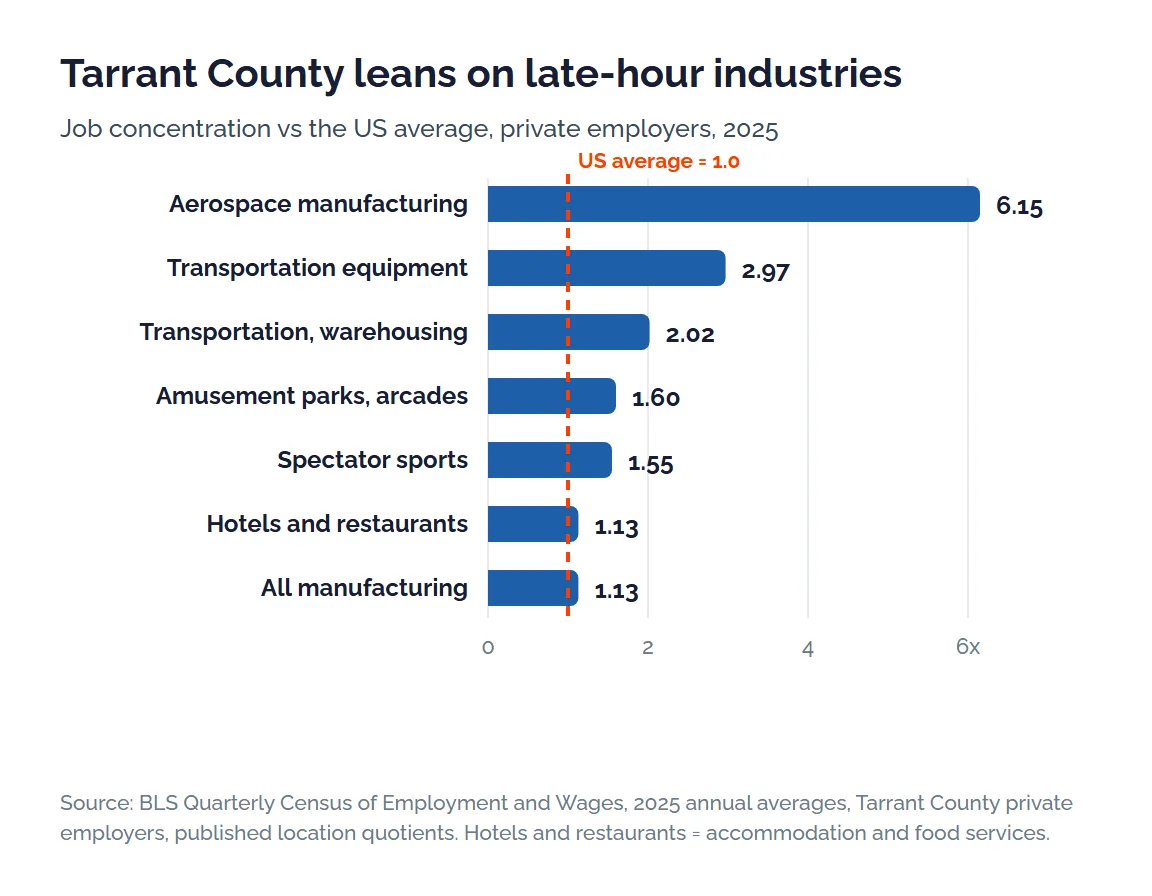
Zoom out to Tarrant County and the pattern holds. In 2025, 38.9% of the county’s private-sector jobs were in manufacturing, transportation and warehousing, hotels and restaurants, arts and recreation, hospitals, or nursing homes, against 33.8% nationally and 28.3% in Dallas County, by our grouping of Bureau of Labor Statistics data. A five-point gap.
Those industries rarely close at 5 p.m. Think second shifts at parts suppliers, Saturday doubleheaders, nights in the ICU, and trailers that have to clear the dock by 4 a.m. Somebody’s always working. So is the network.
Check the hours in your IT contract against the hours your business keeps. A weekday help desk can’t do much for a production line that stops at 11 p.m. on a Friday, and an alert nobody reads until Monday is just a log entry. Hours matter.
So when does your business actually stop working?
Local Data
Arlington and Tarrant County in Six Public Numbers
No sales-deck math here. Every figure comes from the Census Bureau, the Bureau of Labor Statistics, the City of Arlington, and the Texas Attorney General.
402,134
Residents of Arlington in July 2025, the seventh-largest city in Texas (Census Bureau, Vintage 2025).
15M+
Visitors a year who come to Arlington to eat, shop, and stay, by the City of Arlington’s 2025 count.
38.9%
Share of Tarrant County private jobs in industries that run nights and weekends, against 33.8% across the US (BLS QCEW 2025, our grouping).
2.02x
Tarrant County’s concentration of transportation and warehousing jobs compared with the US average, covering 87,218 jobs (BLS QCEW 2025).
Nearly $2B
Investment GM has announced since 2013 for Arlington Assembly, where it builds its entire full-size SUV lineup (City of Arlington).
0
Arlington-addressed organizations on the Texas Attorney General’s breach list for notices posted April 2025 to October 2026. Fort Worth had 7, and Dallas had 28.
Read together, they describe a city that works around the clock. Factories, venues, hospitals, and warehouses set the schedule, and the smaller firms that supply them keep it too. A clean stretch on the AG’s list doesn’t change that. Zero isn’t proof. Texas only requires an AG notice once a breach reaches 250 Texans, so smaller incidents rarely appear on it.
Where these come from. Population is the Census Bureau’s Vintage 2025 city file. Jobs are BLS QCEW 2025 annual averages for private employers. Visitor and GM figures are the City of Arlington’s, and breach counts come from the Texas Attorney General’s public list, read on October 13, 2026.
Four Workplaces
What Fails First at an Arlington Business?
The plant that runs a second shift
A production floor can end up with the machine controllers and the office laptops on one network, and that’s how a single phishing email reaches the line. Keep them apart. Separate the plant network from the office network, watch both around the clock, and keep a spare switch on the shelf, because the failure that stops a line rarely waits for Monday. Defense work adds contract security rules on top, which our page on CMMC compliance for defense suppliers walks through.
The card reader on a sold-out night
If your restaurant, shop, or hotel takes cards, PCI DSS sets the rules, and it got stricter on March 31, 2025, when 51 of the 64 requirements added in version 4 stopped being optional, according to the PCI Security Standards Council. One of them requires multifactor sign-in for every login into the systems that hold card data. Guest Wi-Fi belongs on its own network, well away from the registers.
The clinic that can’t lose a morning
Medical offices near Texas Health Arlington Memorial and Medical City Arlington answer to the HIPAA Security Rule. Under 45 CFR 164.308, it requires an accurate and thorough risk analysis and a backup plan that keeps exact, retrievable copies of electronic patient records. In plain terms, know where every patient file lives and prove you can restore it. Test the restore. Our healthcare IT services in Fort Worth page covers the rest of Tarrant County.
The warehouse with a dock to clear
Tarrant County has twice the national concentration of transportation and warehousing jobs, and inside a distribution building much of the IT runs on wireless. Handheld scanners drop off when access points can’t see past the racks, and one internet line can stall every shipment at once. Two carriers. Wi-Fi mapped to the racking. Alerts that wake someone up. Our guide to managed IT for Texas logistics companies goes further.
Coverage
How Far Is Arlington From the Uprite Office?
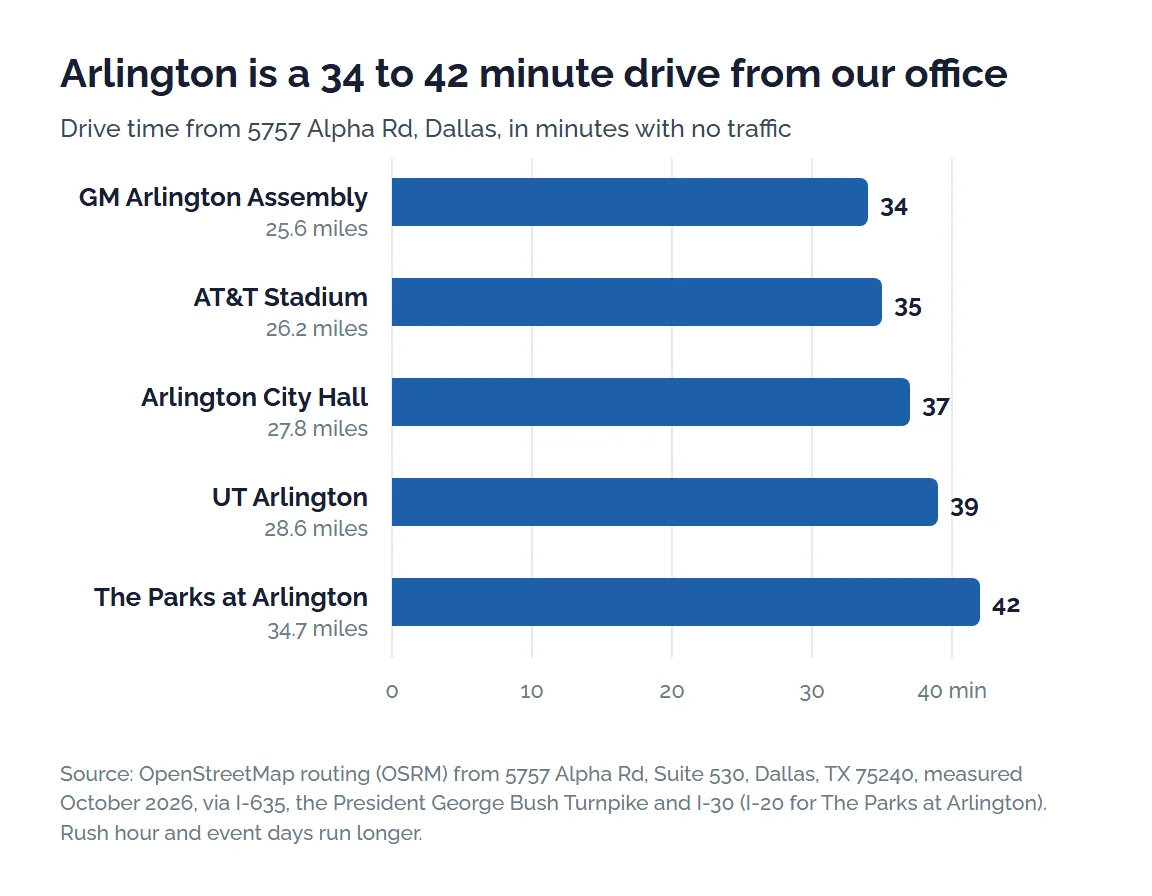
Honest answer? About 35 to 40 minutes, without traffic.
Our office is at 5757 Alpha Rd, Suite 530, Dallas, TX 75240, in North Dallas. OpenStreetMap routing puts the GM plant 34 minutes away with no traffic, AT&T Stadium 35, City Hall 37, UT Arlington 39, and The Parks at Arlington on the south side 42, by way of LBJ Freeway, the George Bush Turnpike, and either I-30 or I-20.
Coverage includes Arlington, Grand Prairie, Mansfield, Kennedale, Pantego, and Dalworthington Gardens. Several neighbors have pages of their own, among them managed IT services in Fort Worth, Grapevine, and Irving. Running sites at both ends of the metroplex? Here’s how we handle Dallas and Fort Worth locations under one MSP.
Remote support handles the everyday tickets. The rest get a technician. Think of a failed switch in a plant closet, a new suite near the stadiums that needs its firewall before opening night, or a clinic printer that won’t talk to the records system. Fully Managed IT includes that on-site work, and the two remote-first plans can add it.
Plans and Pricing
What Do Managed IT Services in Arlington Cost?
$91 to $138 per user per month, for the three managed plans.
With managed IT services, an outside team runs the help desk, patching, security tools, backups, and planning for a flat fee per person. Your plan decides two things. How many hours the help desk covers. And whether a technician comes to your building.
IT Essentials, at $91 per user per month, covers teams under 12 people during business hours, up to 8 hours per user each month, and it’s remote-only. IT Pro, at $110, is the remote-only plan for teams of 12 or more outside the Houston and San Antonio areas, so Arlington teams qualify. It adds 24/7 support, and alerts get answered around the clock.
Fully Managed IT, at $138, is the plan built for buildings with equipment in them. It includes on-site and cloud infrastructure management, after-hours response, quarterly backup testing, and vCIO planning sessions.
| Plan | Per user, per month | Help desk hours | On-site work | Backup testing | Good fit in Arlington |
|---|---|---|---|---|---|
| IT Essentials | $91, remote only | Business hours, up to 8 hrs per user | Available as an upgrade | Once a year | An office of under 12 people that closes at night |
| IT Pro | $110, remote only | 24/7, with alerts answered right away | Available as an upgrade | Twice a year | Teams of 12 or more on laptops and cloud apps, at any hour |
| Fully Managed IT | $138 | 24/7, with after-hours response | Included | Every quarter | Plants, warehouses, clinics, and venues with network gear on site |
Every plan carries two promises. Your rate can’t rise during the first year, and if the service disappoints you in the first 120 days, you can get out of the contract. Microsoft licensing and anything custom are billed on top of the per-user price, as our pricing page explains. Have an IT person already? Then co-managed IT, from $100 per user, or the $40 MSSP security plan may fit better.
One test, every quote. Get the help desk hours and the on-site terms in writing, right next to the price.
Plan Fit
Which Plan Fits the Hours Your Business Keeps?
Start with your hours and your headcount, not a feature list. Here’s how we’d match them. For what round-the-clock coverage should promise on paper, read our guide to after-hours and holiday IT coverage.
| If your business looks like this | Start with | Why |
|---|---|---|
| Under 12 people, open weekdays, everything in Microsoft 365 | IT Essentials, $91 | Business-hours help is enough when nobody works at midnight. |
| 12 or more people, some on nights or weekends, mostly laptops and cloud apps | IT Pro, $110 | Support and alert response run 24/7, and nothing on site needs hands. |
| A plant floor, warehouse, clinic, or venue with network gear in the building | Fully Managed IT, $138 | On-site infrastructure work is included, and backups get tested every quarter. |
| An IT manager on staff who needs depth, cover, or a second opinion | Co-Managed IT, $100 | Your person keeps the keys, and we add after-hours support, security, and planning. |
| IT run in-house, but nobody watches security around the clock | MSSP Security Focus, $40 | Firewall, SIEM, and SOC monitoring, with incident response and quarterly security reviews. |
Running a second shift or an event weekend?
Send us your hours and your headcount. We’ll show you which plan covers them, in writing.
Get a Free IT AssessmentOnboarding
From First Call to First Ticket in Arlington
There are five steps. You won’t pay for either of the first two.
Step 1. Tell us your hours
A 30-minute call covers your headcount, your shifts, the systems you run, and what keeps breaking. Bring the after-hours problems. Those usually decide the plan.
Step 2. A free written assessment
An engineer reviews the firewall, the switches and Wi-Fi, the patch level on your computers, your backup history, and the Microsoft 365 tenant. You keep the written report. Sign or don’t.
Step 3. A proposal at website prices
You’ll see one plan, one seat count, and a separate line for anything the plan doesn’t cover. The per-user price matches the one on our website. Nothing is buried.
Step 4. Two to four weeks of onboarding
Monitoring goes onto every computer and server first. After that come the security tools, a password vault for admin logins, and a map of the network, closet by closet, including the production and scanner networks at plants and warehouses.
Step 5. Support that keeps your hours
The help desk takes tickets around the clock on IT Pro and Fully Managed IT, while IT Essentials covers business hours. Planning runs on the plan’s schedule, from quarterly reviews on IT Essentials to monthly virtual check-ins on IT Pro and vCIO sessions on Fully Managed IT.
Plant equipment on old operating systems, a records system with no vendor support left, or an audit already underway can stretch the timeline. The proposal will say so.
Why Uprite
Three Things You Can Verify Without a Sales Call
Prices anyone can look up
Our three managed plans, $91, $110, and $138 per user, are listed publicly. The Texas MSP pricing index puts them beside what other Texas providers charge, so you can run the comparison on your own. No call needed.
A Texas team with a Dallas office
Uprite is a 42-person Texas company with offices in Houston, San Antonio, and Dallas. Its Dallas engineers include the Trif Technologies team, which joined Uprite in August 2026 after supporting DFW businesses since 2000.
Audited controls, measured response
An independent SOC 2 Type 1 examination of our controls was completed in 2023. Tickets get a first response in about 5 minutes on average, a number we measure rather than promise in a contract.
Client Reviews
Hector and Kareem are super helpful! They are always willing to take on my computer problems even if its small. I had my mouse disappear off my screen, it was an user issue but Hector didn't make me feel small or "dumb" for this error. We love uprite!
Gerardo Sanchez was very helpful & professional. Uprite Services has great customer service and outstanding technicians. We have used them for several years and will continue our business with them.
I had been having trouble with an IT matter that I didn't think would be fixed but Arvin Ebueng from Upright took his time with me and worked with me until we were able to resolve the issue. The issue was an internal issue with the way the program was written, but Arvin came up with a great work around so that I am now able to do what I need to do at my job. Long story short, he got me access to both things that I need access to simultaneously and daily. Thanks 😊 Arvin, you are much appreciated 👏 💐 🥳.
I’ve been extremely satisfied with Uprite Services and would recommend them without hesitation. They consistently deliver reliable, high-quality work and truly feel like a true partner rather than just another vendor. A special thank you goes to Arvin Ebueng, he is always quick to respond to our needs and incredibly easy to communicate with. No matter how busy things get, Arvin makes sure we’re taken care of promptly and with a smile. His responsiveness and clear communication have made every interaction smooth and stress-free. Thank you, Arvin and the entire Uprite team, Peerless Equipment is a customer for life!
I'm am not a "tech" person, however the team at Uprite gets me through the technological side of computers and software so that I can function on a daily basis... but the most enduring quality is that they care. Special shoot out to Mary, Sergio, Eufemio, Hector, and Jeff just to name a few... I appreciate each of you and the help you give me.
Great service by Juan and Jacob. Always helping us out at Alamo City Trailer Sales. We have been using this company for over 10 years and always happy with the work they do.
FAQ
What Arlington Companies Ask About Managed IT Services
On Uprite’s published plans, managed IT services in Arlington cost $91, $110, or $138 per user per month. IT Essentials at $91 is remote-only for teams under 12, IT Pro at $110 is remote-only with 24/7 support for teams of 12 or more, and Fully Managed IT at $138 adds on-site work. Licensing is extra. For what Tarrant County providers tend to quote, see managed IT cost in Fort Worth.
Not in Arlington itself. Our Dallas office at 5757 Alpha Rd, Suite 530, is 34 to 42 minutes from the Arlington locations we measured, with no traffic. Help desk tickets get handled remotely, and technicians make the drive for on-site work.
Yes, on IT Pro and Fully Managed IT, which both include 24/7 support. IT Essentials covers business hours only, up to 8 hours per user each month, so it suits an office that closes at night. Plants, hotels, and clinics usually belong on one of the 24/7 plans.
If it accepts payment cards, it does. PCI DSS covers any business that stores, processes, or transmits cardholder data, and since March 31, 2025, the stricter version 4 requirements have been mandatory, including multifactor sign-in for all access into the cardholder data environment. Keep guest Wi-Fi and the registers on separate networks.
The HIPAA Security Rule marks three IT safeguards as required, not optional, in 45 CFR 164.308. The three are an accurate and thorough risk analysis, a plan to manage the risks it finds, and a data backup plan that keeps exact, retrievable copies of electronic patient records. For an Arlington practice, the work usually starts with an inventory of every device that touches patient data.
Senate Bill 2610 and the breach-notice rules in section 521.053 of the Business and Commerce Code matter most. SB 2610, in effect since September 1, 2025, shields businesses with fewer than 250 employees from exemplary damages after a breach if they kept a security program sized to their headcount, from password rules and training under 20 employees to CIS Controls Implementation Group 1 at 20 to 99 and a framework such as NIST’s at 100 to 249. Separately, a breach involving 250 or more Texans has to be reported to the Attorney General within 30 days.
The average is about 5 minutes, measured across all tickets. Treat it as a track record rather than a contract term, because it isn’t a contractual guarantee. Your contract protection is the 120-day satisfaction promise, which lets you leave if the service falls short.
Next Step
Get Arlington IT Support That Keeps Your Hours
A free assessment comes first. Tell us when your business runs and how many people use its systems, and we’ll send back a written plan match within 48 hours.
Whatever plan fits, the rate you sign at is the rate you pay for the first year.
Prefer the phone? Call our Dallas office at (469) 699-8766.



